• Debian 11 is approaching its end-of-life (vendor EOL date - August 31, 2026). Plesk Obsidian 18.0.80 will be the last release to support it.
    If you are running Plesk Obsidian on Debian 11, we recommend you upgrade those servers to Debian 12 using our dist-upgrade tool.
  • We plan to deprecate and remove the support for XML RPC protocol versions earlier than 1.6.9.1 in Plesk Obsidian 18.0.82. We strongly recommend that you update all existing integrations using earlier versions of the XML RPC protocol to comply with the version 1.6.9.1 specification.

Issue Nginx caching issue.

khaled

New Pleskian
Hello, I almost a week and I didn't manage to setup the cache correctly thought Nginx.
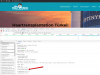
I just getting : x-cache-status: BYPASS


-Plesk Onyx v17.8.11_build1708180301.19 os_Ubuntu 16.04
-wordpress.

I am using Cloudflare.

I tried to add :
proxy_ignore_headers "Set-Cookie";
proxy_hide_header "Set-Cookie";

to Additional Nginx directives. nothing change I keep getting: x-cache-status: BYPASS
 

Attachments

  • 2019-11-13_1113.png
    2019-11-13_1113.png
    469.9 KB · Views: 39
  • 2019-11-13_1112.png
    2019-11-13_1112.png
    148.1 KB · Views: 37
  • 2019-11-13_1111.png
    2019-11-13_1111.png
    117.5 KB · Views: 36
According to your first screenshot, you are opening your homepage. This is not a static file but a .php file. All dynamic content is forwarded to Apache and not cached by Nginx. Only static files are cached.

Instead try to request an image file only and check again whether it is cached. Also keep in mind that the cache is a short time cache only, so only if the same file is requested within n seconds it will be delivered from the cache.
 
Thank you. I really tried the same steps in the last article. but not sure what is the problem still.
 
Back
Top