Facebook
 Twitter
Azurel
Silver Pleskian
Username:
TITLE
Not used PHP versions removed, but Plesk reports missing versions
PRODUCT, VERSION, OPERATING SYSTEM, ARCHITECTURE
Plesk Obsidian 18.0.78 Update #3
AlmaLinux 8.10
PROBLEM DESCRIPTION
I uninstalled PHP 8.2 and PHP 8.3 because no domains on this server were using those PHP versions anymore.
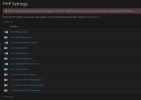
However, under PHP Settings I now get the following warning:
After some investigation, I noticed that at least PHP 8.3 was still configured in one of my "Service Plan"s. For the plans "Default Domain" and "Default Simple", I could simply change the PHP version to PHP 8.5 and save the plan with "OK".
1. The problem is the "Unlimited" service plan. Plesk wants me to synchronize the plan with all subscriptions. I do not want to do that, and I assume I should not do it either, because the subscriptions may have individual PHP settings that differ from the service plan. Why is it not possible to simply save the service plan with a new default PHP version for future subscriptions only, similar to how unused settings can be changed without forcing a synchronization?
2. Also, how can I determine where PHP 8.2 is still being referenced? The warning correctly tells me that PHP 8.2.31 is still configured somewhere, but it does not provide any information about where to look. It would be very helpful if the error message included additional details, such as which service plan, subscription, or configuration is still referencing the removed PHP version.
Am I missing something, or is there a recommended way to identify these remaining references before removing old PHP versions?
STEPS TO REPRODUCE
See description
ACTUAL RESULT
See description
EXPECTED RESULT
1. Better error message.
2. The option to save the service plan without synchronisation, for future subscriptions.
ANY ADDITIONAL INFORMATION
I see this as a bug, as it seems to me that synchronisation overrides the PHP settings of the domains concerned, or even changes their mode (FPM application / Dedicated FPM application).
YOUR EXPECTATIONS FROM PLESK SERVICE TEAM
Confirm bug
TITLE
Not used PHP versions removed, but Plesk reports missing versions
PRODUCT, VERSION, OPERATING SYSTEM, ARCHITECTURE
Plesk Obsidian 18.0.78 Update #3
AlmaLinux 8.10
PROBLEM DESCRIPTION
I uninstalled PHP 8.2 and PHP 8.3 because no domains on this server were using those PHP versions anymore.
However, under PHP Settings I now get the following warning:
I'm not quite sure what ‘plesk repair web -php-handlers’ does here, or even what it changes.Error: The following PHP version(s) are not installed: 8.3.31, 8.2.31. Install them or run plesk repair web -php-handlers to select another PHP version.
After some investigation, I noticed that at least PHP 8.3 was still configured in one of my "Service Plan"s. For the plans "Default Domain" and "Default Simple", I could simply change the PHP version to PHP 8.5 and save the plan with "OK".
1. The problem is the "Unlimited" service plan. Plesk wants me to synchronize the plan with all subscriptions. I do not want to do that, and I assume I should not do it either, because the subscriptions may have individual PHP settings that differ from the service plan. Why is it not possible to simply save the service plan with a new default PHP version for future subscriptions only, similar to how unused settings can be changed without forcing a synchronization?
2. Also, how can I determine where PHP 8.2 is still being referenced? The warning correctly tells me that PHP 8.2.31 is still configured somewhere, but it does not provide any information about where to look. It would be very helpful if the error message included additional details, such as which service plan, subscription, or configuration is still referencing the removed PHP version.
Am I missing something, or is there a recommended way to identify these remaining references before removing old PHP versions?
STEPS TO REPRODUCE
See description
ACTUAL RESULT
See description
EXPECTED RESULT
1. Better error message.
2. The option to save the service plan without synchronisation, for future subscriptions.
ANY ADDITIONAL INFORMATION
I see this as a bug, as it seems to me that synchronisation overrides the PHP settings of the domains concerned, or even changes their mode (FPM application / Dedicated FPM application).
YOUR EXPECTATIONS FROM PLESK SERVICE TEAM
Confirm bug