Facebook
 Twitter
Paul Hermans
Basic Pleskian
Username: Paul Hermans
TITLE
Notifications about available and installed system package updates Email address not used
PRODUCT, VERSION, OPERATING SYSTEM, ARCHITECTURE
Plesk 18.0.37 Update #2
Centos Linux 8.4
PROBLEM DESCRIPTION
On page: Plesk > Tools & Settings > Update Settings
Under "Notifications" enabled "Notify about available and installed system package updates"
Email address: filled with a valid email address
Notification email frequency: Daily
This email address is ignored / not used when sending these notifications.
I believe the email address from the Administrator Profile is used.
STEPS TO REPRODUCE
On page: Plesk > Tools & Settings > Update Settings
Under "Notifications" enable "Notify about available and installed system package updates"
Email address: fill with a valid email address (different from Administrator profile)
Notification email frequency: Daily
Wait for automatic update of Plesk Panel to take place.
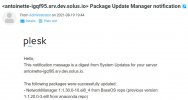
See the email with subject "The Panel was successfully updated at ...." not send to the right email adress.
ACTUAL RESULT
See the email with subject "The Panel was successfully updated at ...." send to the administrator profile email address.
EXPECTED RESULT
Expect to see the email with subject "The Panel was successfully updated at ...." at the notifications email address
ANY ADDITIONAL INFORMATION
YOUR EXPECTATIONS FROM PLESK SERVICE TEAM
Confirm bug
TITLE
Notifications about available and installed system package updates Email address not used
PRODUCT, VERSION, OPERATING SYSTEM, ARCHITECTURE
Plesk 18.0.37 Update #2
Centos Linux 8.4
PROBLEM DESCRIPTION
On page: Plesk > Tools & Settings > Update Settings
Under "Notifications" enabled "Notify about available and installed system package updates"
Email address: filled with a valid email address
Notification email frequency: Daily
This email address is ignored / not used when sending these notifications.
I believe the email address from the Administrator Profile is used.
STEPS TO REPRODUCE
On page: Plesk > Tools & Settings > Update Settings
Under "Notifications" enable "Notify about available and installed system package updates"
Email address: fill with a valid email address (different from Administrator profile)
Notification email frequency: Daily
Wait for automatic update of Plesk Panel to take place.
See the email with subject "The Panel was successfully updated at ...." not send to the right email adress.
ACTUAL RESULT
See the email with subject "The Panel was successfully updated at ...." send to the administrator profile email address.
EXPECTED RESULT
Expect to see the email with subject "The Panel was successfully updated at ...." at the notifications email address
ANY ADDITIONAL INFORMATION
YOUR EXPECTATIONS FROM PLESK SERVICE TEAM
Confirm bug