• Debian 11 is approaching its end-of-life (vendor EOL date - August 31, 2026). Plesk Obsidian 18.0.80 will be the last release to support it.
    If you are running Plesk Obsidian on Debian 11, we recommend you upgrade those servers to Debian 12 using our dist-upgrade tool.
  • We plan to deprecate and remove the support for XML RPC protocol versions earlier than 1.6.9.1 in Plesk Obsidian 18.0.82. We strongly recommend that you update all existing integrations using earlier versions of the XML RPC protocol to comply with the version 1.6.9.1 specification.

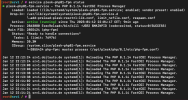
Resolved PHP 8.1 Another FPM instance seems to already listen on [...] php-fpm.sock

You're missing /opt/plesk/php/8.1/etc/php-fpm.d/forum.doitauto.de.conf file. I would copy a known good conf file to that location and see if it helps.

This article might also help you out:

Otherwise, log into your plesk instance to get your license and open a ticket with support.
i have got use this but nothing work
 
That's how I solved the problem, I deleted all installed php versions, then I executed the following command "plesk repair web -php-handlers -php-fpm-configuration" there was a message if I wanted to disable php support and I I answered yes and deactivated the php on the server then I set all domains to "FastCGI application served by Apache" then all doamins worked again but you have to set all domains on your server like this then I again used "Add or Remove Components" only installed php 8.1 and set the PHP supprt version: FPM application served by nginx for each domain and the problem was solved
 
Back
Top