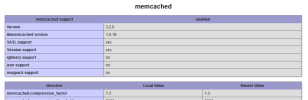
S StephM New Pleskian Sep 9, 2022 #1 Server operating system version Debian 10 Plesk version and microupdate number 18.0.46 Hi, i install a new plesk server (Debian 10 - plesk 18.0.46) and when i add a new php extension (memcache, acpu ...) they don't appear on Plesk panel. https://support.plesk.com/hc/en-us/articles/115000065409-How-to-install-uninstall-memcached-PHP-extension-for-Plesk-PHP-handlers Thanks
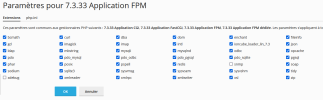
Hi, i install a new plesk server (Debian 10 - plesk 18.0.46) and when i add a new php extension (memcache, acpu ...) they don't appear on Plesk panel. https://support.plesk.com/hc/en-us/articles/115000065409-How-to-install-uninstall-memcached-PHP-extension-for-Plesk-PHP-handlers Thanks
IgorG Plesk addicted! Plesk Certified Professional Sep 9, 2022 #2 And what does the output of the command from step 8 of the instructions show, as well as phpinfo()?
M Maarten Golden Pleskian Plesk Guru Sep 9, 2022 #4 The first screenshot is PHP 7.3. Can you check if the extension is available in PHP 7.4? Tools & Settings -> PHP -> 7.4.* -> Extensions
The first screenshot is PHP 7.3. Can you check if the extension is available in PHP 7.4? Tools & Settings -> PHP -> 7.4.* -> Extensions
M Maarten Golden Pleskian Plesk Guru Sep 9, 2022 #6 I don't know why it doesn't show in the extension overview, but the extension works and is installed correctly. Otherwise, it wouldn't show in phpinfo().
I don't know why it doesn't show in the extension overview, but the extension works and is installed correctly. Otherwise, it wouldn't show in phpinfo().