Facebook
 Twitter
Steven_Procopio
New Pleskian
TITLE:
PHP not installed or won't install
PRODUCT, VERSION, OPERATING SYSTEM, ARCHITECTURE:Plesk 17.9.2, Windows 2019
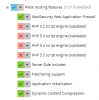
PROBLEM DESCRIPTION:I successfully installed Plesk 17.9.2 through the command line to select the testing versions. When I got to add additional components such as PHP, the only PHP listed is PHP 5.x outdated versions. If I wanted to install any newer versions 7.0, 7.1, 7.2, 7.3 I'm unable to they aren't even listed.
I'm sure this is something simple, maybe something I didn't setup in Windows when I installed IIS.
STEPS TO REPRODUCE:I'm sure this is something simple, maybe something I didn't setup in Windows when I installed IIS.
Go to Tools & Settings > Plesk > Updates and Upgrades. Start the installer, attempt to add components PHP 5 versions are present but PHP 7 versions are not under Plesk Hosting Features
ACTUAL RESULT:Nothing is present under Plesk Hosting Features except for PHP 5 versions and no PHP 7 versions
EXPECTED RESULT:PHP versions to be shown and able to install
ANY ADDITIONAL INFORMATION:
YOUR EXPECTATIONS FROM PLESK SERVICE TEAM:Help with sorting out