Facebook
 Twitter
Hello!
Last night my windows 2008 Plesk runs an Update (Patch 30).
By mail a information - look at the logs.
Logfile:
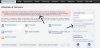
There is also an error in my plesk panel (first page).
But: On the right side there is an information: Last update: today - Version 11.5.30 Patch 30
What is wrong? The mail information? How I can check the update status (OK, not OK)?
The Plesk versionnumber is: Parallels Plesk Panel v11.5.30_build20130808.09 os_Windows 2008/2012
OS: Microsoft Windows 6.1;build-7601; sp1
Thank you for every answer!
Last night my windows 2008 Plesk runs an Update (Patch 30).
By mail a information - look at the logs.
Logfile:
Code:
Execution failed.
Command: ai.exe
Arguments: Array
(
    [0] => --select-product-id
    [1] => panel
    [2] => --select-release-current
    [3] => --upgrade-installed-components
)

Details: BUSY: Update operation was locked by another update process.
There is also an error in my plesk panel (first page).
But: On the right side there is an information: Last update: today - Version 11.5.30 Patch 30
What is wrong? The mail information? How I can check the update status (OK, not OK)?
The Plesk versionnumber is: Parallels Plesk Panel v11.5.30_build20130808.09 os_Windows 2008/2012
OS: Microsoft Windows 6.1;build-7601; sp1
Thank you for every answer!