• The new Python extension is now available. It allows customers to deploy and manage WSGI-based Python applications on their websites directly from Plesk.
  • Debian 11 has reached its end-of-life (vendor EOL date - August 31, 2026). Plesk Obsidian 18.0.81 is the last release to support it.
    If you are running Plesk Obsidian on Debian 11, we recommend you upgrade those servers to Debian 12 using our dist-upgrade tool.
  • We plan to deprecate and remove the support for XML RPC protocol versions earlier than 1.6.9.1 in Plesk Obsidian 18.0.82. We strongly recommend that you update all existing integrations using earlier versions of the XML RPC protocol to comply with the version 1.6.9.1 specification.

Plesk 12 on centOS 6.7 final error condjob

WSNHosting

Regular Pleskian
Hello

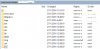
i have probleam about condjob not work and have some folder in my site
sshot-4.png

how to fix it ..

thankyou
 
It is related to chrooted shell. Directory /var/www/vhosts/chroot has all these directories along with bin, dev, etc, tmp, usr, and var. These are being copied to the domain's virtual host directory.

What do you mean "cronjob not work"? Any detail, results of troubleshooting, etc?
 
hello

error :

user with id=10001 and name=xxxxx not found in chrooted passwd file
system error: No such file or directory

but next server run pass and not have floder bin, dev, etc, tmp, usr, and var.

can setup not show bin, dev, etc, tmp, usr, and var. in folder ?

sshot-5.png
thankyou
 
If you need change this behaviour server wide shell need to be changed to '/bin/sh' using the below utility:

# /usr/local/psa/bin/server_pref -u -crontab-secure-shell "/bin/sh"

Or for particular domain:

From Plesk GUI, Home >> Subscriptions >> domain.com >> Websites & Domains >> Web Hosting Access, change shell of system user for a particular domain: change ftp access from "forbidden" to /bin/sh, bin/bash and after to "forbidden".
 
Back
Top