• Inviting everyone who uses WordPress management tools in Plesk
    The Plesk team is conducting a 60-minute research session that includes an interview and a moderated usability test.
    To participate, please use this link .
    Your experience will help shape product decisions and ensure the tools better support real-world use cases.

Plesk Control Panel IIS Bindings

Axodious

New Pleskian
Is it safe to bind the PleskControlPanel site to a specific hostname or IP address? I only want the panel accessible by it's FQDN.
 
What about changing it here: Tools & Settings>Server Settings>Full hostname
 
It's set there, however I can still access the panel from any domain on the panel and in IIS the binding is currently set to all IP addresses and no hostname.
 
You can manually add IP binding in IIS. Add the required hostnamein IIS binding and check again.
 
As InderS meant you can just go to Internet Information Services (IIS) Manager (found at C:\ProgramData\Microsoft\Windows\Start Menu\Programs\Administrative Tools)

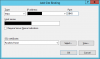
Expand your computer name and sites click PleskControlPanel then at the right side click Bindings... click add

binding.png

You will know what to enter.

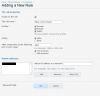
Of course don't forget to add a firewall rule if you use one and you should do that in the plesk control panel so it will remember in future.

firewallrule.png

After you have added the firewall rule restart your server to apply the changes.

These were done in Plesk 12. I also apologize if I replied to the wrong topic which is for 11.x but the way to set up is same compared to 12.x.
 
Last edited:
Back
Top