• The APS Catalog has been deprecated and removed from all Plesk Obsidian versions.
    Applications already installed from the APS Catalog will continue working. However, Plesk will no longer provide support for APS applications.
  • Please be aware: with the Plesk Obsidian 18.0.78 release, the support for the ngx_pagespeed.so module will be deprecated and removed from the sw-nginx package.

Resolved Plesk Extension - Let's Encrypt for default Plesk Certificate

x.wolverine.x

New Pleskian
Dear all,

Im running: 12.5.30 Update #56 on CentOS 6.7
I'm using the Plesk Extension - Let's Encrypt for my Domais, it worked like a charm.
But I'm trying to run let's encrypt extension to manage the default root Certificate for my Server.
Is it possible to add a default server Certificate managed by the let's encrypt extension under "Tool & Settings => SSL Certificates"?

Thank you
 
It is possible in Plesk Onyx:

1. Create your domain in Plesk, the same as your server hostname.
2. Go to Extensions > Let's Encrypt, and create your certificate for your domain. (Just writing your email, no checkboxes needed).
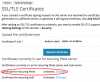
3. Then go to Tools & Settings > SSL/TLS Certificates and set your certificate on "Certificate for securing Plesk" option.
4. Logout, reload and login.

Screenshot at янв. 10 10-13-43.png

Also you can install the Plesk Security Advisor extension in the Extensions menu in Plesk: https://www.plesk.com/extensions/security-advisor/
It will switch on HTTPS (SSL) & HTTP/2 for all domains on the server and secures Plesk itself. Also it takes care of migrating WordPress sites to HTTPS.
 
Hi IgorG,

thank you for your replay. Then I will have to inform myself about Onyx, and findout the diffrence between it and web pro.

Best regards
 
Back
Top