• The APS Catalog has been deprecated and removed from all Plesk Obsidian versions.
    Applications already installed from the APS Catalog will continue working. However, Plesk will no longer provide support for APS applications.
  • Please be aware: with the Plesk Obsidian 18.0.78 release, the support for the ngx_pagespeed.so module will be deprecated and removed from the sw-nginx package.

Forwarded to devs Plesk Git pull deploys wrong branch

Duarte N

New Pleskian
Username:

TITLE

Plesk Git pull deploys wrong branch

PRODUCT, VERSION, OPERATING SYSTEM, ARCHITECTURE

Plesk Obsidian v18.0.72_build20250915.05 os_Windows 2016/2019/2022/2025

PROBLEM DESCRIPTION

After updating Plesk, when performing "Pull now" on a Git repository via the Plesk Git extension, the repository branch is unexpectedly switched to the default repository/branch defined in Git.
In the Plesk GUI the selected repository/branch appears correct, but in the file
vhosts\domain.com\git\test.domain.com\HEAD
the branch reference is overwritten with the default one.

STEPS TO REPRODUCE

  1. Configure a Git repository in Plesk and set it to use a branch other than the default (e.g. staging).
  2. Verify in the Plesk GUI that the selected branch is correct.
  3. Execute "Pull now" from the Plesk Git interface.
  4. Check the file vhosts\domain.com\git\test.domain.com\HEAD.

ACTUAL RESULT

The file HEAD is modified to point to the default branch (e.g. master).
As a result, even though the GUI shows staging, the content deployed corresponds to master.

EXPECTED RESULT

The HEAD file should remain pointing to the branch selected in the Plesk GUI (e.g. staging) and the deployment should be executed from that branch.

ANY ADDITIONAL INFORMATION

The bug appeared after Plesk update to version Plesk Obsidian 18.0.72 Update 2 and/or Update 3 and not from a Git extension update.

YOUR EXPECTATIONS FROM PLESK SERVICE TEAM

Confirm bug
 
Thank you for the report, @Fullscreen . The behavior is confirmed as a bug with ID EXTGIT-350. At this point, I cannot provide a workaround or an ETA for the fix. I will follow-up with more details as soon as possible.
 
Thank you for the report, @Fullscreen . The behavior is confirmed as a bug with ID EXTGIT-350. At this point, I cannot provide a workaround or an ETA for the fix. I will follow-up with more details as soon as possible.
Hi. Any news? This bug is causing several problems in one of our servers, we have than 400 websites that we need to do deployments in a day based.
 
@Alfonso Uritec , our team is still working on fixing the issue. In the meantime, the workaround they proposed is to:

1. Switch the branch from the target one (e.g. development) to any other (e.g. main)
2. Switch back to the target branch (e.g. development)
3. After that you should see the actual files and commits.

I hope that helps.
 
Thanks for the reply

Yes, your workaround worked once (the first day that we noticed the issue), but when I pushed to the dev branch the changes in Plesk were reverted and it overwrote everything again.
So now we're locked without being able to use that dev branch.
 
Instead of using the Plesk interface for git while waiting on the development team to fix it, why not use the SSH terminal? The git commands still works for switching branches and such.
 
Instead of using the Plesk interface for git while waiting on the development team to fix it, why not use the SSH terminal? The git commands still works for switching branches and such.
You might think that I'm stupid, but I've never used SSH with Plesk and I don't have any idea about how to enable it. And I would prefer not to open any new port that will be scanned by all the attackers.
 
No ports needed to be open, plesk has a SSH terminal built in (at both the root level and domain level, although in this case you would want domain level which needs to be enabled at the domain level).

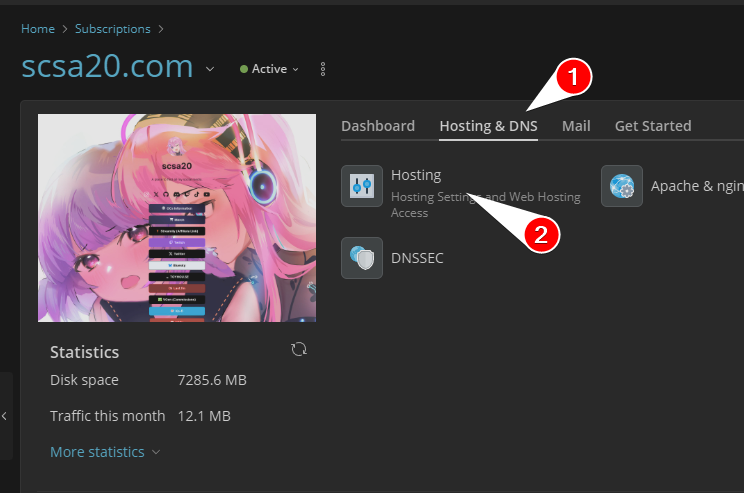
Just need to go to the domain > Hosting & DNS > Hosting
raw


Scroll down to SSH access and set the type then save
-- By default it's set to Forbidden
-- You will see many different kinds, but I would recommend using /bin/bash since it gives you better syntax

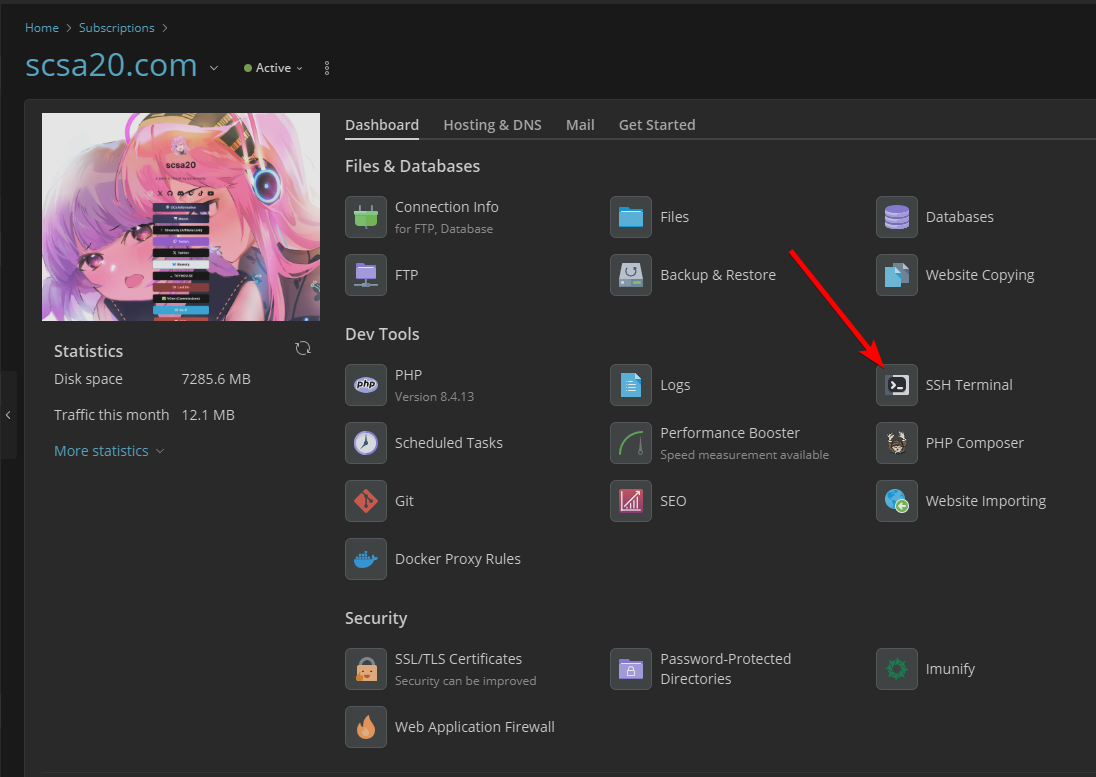
Once it's enabled, switch back to Dashboard and you will now have the SSH Terminal button.
raw

Click on that to get access to the terminal and you can do whatever (this is done at the user level of the domain thus why I recommend it doing this way to ensure proper permissions and what not).
 
No ports needed to be open, plesk has a SSH terminal built in (at both the root level and domain level, although in this case you would want domain level which needs to be enabled at the domain level).

Just need to go to the domain > Hosting & DNS > Hosting
raw


Scroll down to SSH access and set the type then save
-- By default it's set to Forbidden
-- You will see many different kinds, but I would recommend using /bin/bash since it gives you better syntax

Once it's enabled, switch back to Dashboard and you will now have the SSH Terminal button.
raw

Click on that to get access to the terminal and you can do whatever (this is done at the user level of the domain thus why I recommend it doing this way to ensure proper permissions and what not).
Thank you for your time
Your instructions are very clear but I don't have that SSH option in the Hosting pane.
I guess that this applies only to Linux hosting and we're using a windows server
 
As a workaround, you can modify the file
Code:
vhosts\domain.com\git\test.domain.com\config
and change this lines:

from:
Code:
fetch = +refs/*:refs/*
mirror = true

to:
Code:
fetch = +refs/heads/dev:refs/remotes/origin/dev
(if your branch name is "dev", otherwise change it)

You have to change also
Code:
vhosts\domain.com\git\test.domain.com\HEAD
to point to your branch, as @Duarte N stated on his post.
 
Six months since EXTGIT-350 was confirmed. No fix. No ETA. No working workaround. :mad:

To be clear about what has been tried:
- Post #8 workaround (switch branch and switch back): temporary only, reverts on next push (confirmed by Alfonso Uritec in post #9).
- Post #15 workaround (edit git config to remove mirror=true and rewrite fetch refspec): tested, did not resolve the issue.

But this is not even the full picture. The token-saving bug (EXTGIT-337), which I reported in April 2024 (nearly two years ago) is still open. It was classified as a "not prioritized edge case" (post #7 in Forwarded to devs - GIT extension 2.5.2 does not save token) despite other users confirming the exact same problem. An "edge case" that prevents authentication with private repositories on Windows + Azure DevOps is not an edge case, it is a broken feature!

Combined, EXTGIT-337 and EXTGIT-350 mean the Git extension on Plesk for Windows is fundamentally broken for private repositories with non-default branches. That covers the majority of professional deployment workflows.

With respect: a confirmed bug in a core extension that remains unfixed for six months (and another for nearly two years) needs to be escalated internally. What is the actual status of EXTGIT-350? Is someone working on it? Is there a target release?
 
Hi, @Duarte N . The bug reported in this thread regarding the branch update failure should be fixed already (as of Plesk 18.0.75). Could you please confirm what's the Plesk version running on the server in question as well as the version of the Git extension. For what is worth, I can no longer replicate it on a test environment.

Regarding the other bug you mentioned concerning token saving, I will need some time to consult with our team, but from what I can remember the combination of Azure DevOps + Windows was considered as pretty rare case, which is why the bug was not prioritized. I will follow-up with more details on that matter as soon as possible.
 
Back
Top