• Halloween is coming! To celebrate the occasion, we dusted off a couple of old skins, and even created a brand new one (Pixel).
    To get into the festive spirit, install the Skins extension.
  • The new Python extension is now available. It allows customers to deploy and manage WSGI-based Python applications on their websites directly from Plesk.
  • The Plesk Mobile apps for iOS and Android and the Plesk Mobile Center extension have been deprecated, and are no longer available for new installations. In Plesk Obsidian 18.0.84, the Plesk Mobile Center extension will be removed from servers during the upgrade, and the Plesk Mobile apps will lose their server management features.
  • The Social Login extension has been deprecated and will be removed in Plesk Obsidian 18.0.84. After that, it will no longer be possible to log in to Plesk with a Google, Facebook, GitHub account, or with a passkey. Plesk usernames and passwords, as well as logging in with a WebPros Account, are not affected.

Resolved Plesk mobile log file makes server backup large

King555

Silver Pleskian
Since I installed the "Plesk mobile" extension my daily server backup via Plesk (only configuration and e-mails) is much larger than before and gets larger every day. Now I found out that there is a log file called "MobileConnector.log" in that backup and this file currently is 60 MB in size.

The questions are: Why is that file in the backup and how can I avoid it being in the backup? Or is this a reportable bug?
 
Make sure that checkbox "Exclude log files" is ticked in Backup Settings.
 
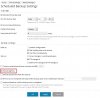
I cannot find this checkbox. I only have "domain config", "e-mail config and content", and "user files and datebases". This is under "settings for planned backup". Is there another settings page I do not find? Plesk Onyx 17.8.

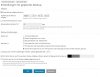
EDIT: OK, found it under "Create backup". But how do I exclude the log files when creating backups automatically?

EDIT #2: The area with the checkbox is hidden via JavaScript:

Code:
Jsw.onReady(function() {
    var masterCheckboxFunction = function() {
        if ($('backup-settings-excludeFilesMasterCheckbox').checked) {
            $('backup-settings-exclude_files-form-row') && $('backup-settings-exclude_files-form-row').show();
        } else {
            $('backup-settings-exclude_files-form-row') && $('backup-settings-exclude_files-form-row').hide();
        }
    };

    ["backup-settings-excludeFilesMasterCheckbox"].forEach(function (id) {
        $(id).observe('click', masterCheckboxFunction);
    });
    masterCheckboxFunction();
});

Why?
 
Last edited:
This checkbox does not exist (in my Plesk) when doing scheduled backups!

EDIT:
plesk.jpg
 
Last edited:
MobileConnector.log is Plesk mobile extension's log file and it cannot be excluded from backups. As an option, it is possibly to add entry to /etc/logrotate.d to rotate MobileConnector.log.
 
Thanks!

By the way, now I found out why I do not have this checkbox. It only appears when I tick "User files and datebases".
 
I think consistency is the key here. If the logs are supposed to be included in the backup, than this log file should be included too. If they aren't, than this particular one shouldn't be either. Isn't this already the case, as it is now?

If only the actual log size is the issue, than rotating the log is indeed the correct approach, IMHO.
 
I did not configure Plesk to include the logfiles. So this log should not be included, But it is. And as this seems to be no bug, I have to post this as a feature request.

I guess it's because of the fact that this is an extension logfile, not a log of any server software.
 
Back
Top