
 Facebook
 Twitter
Mario Bernard
New Pleskian
I've seen this discussed in the windows side, but that didn't provide any help.
In Plesk when I go to "Updates and Upgrades" I get the following errors:
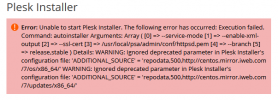
If I try to start Plesk Installer from the command line, I get these errors:
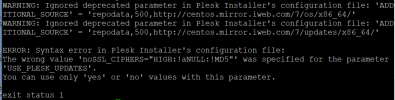
I've not found anything useful via Google either. Any help would be appreciated.
Thanks!
In Plesk when I go to "Updates and Upgrades" I get the following errors:
If I try to start Plesk Installer from the command line, I get these errors:
I've not found anything useful via Google either. Any help would be appreciated.
Thanks!


