Facebook
 Twitter
S
SanderA
Guest
Hello everybody,
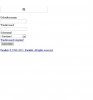
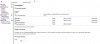
when I want to open my PLESK panel it only shows a real basic layout, only white screen with some text on it (like if CSS does not load). When I login this does not change, and most of the functions do not work or load at all. I cannot configure anything.
Even singing off does not work anymore. Please have a look at the attached screenshots.
Thank you for your advice