• Debian 11 is approaching its end-of-life (vendor EOL date - August 31, 2026). Plesk Obsidian 18.0.80 will be the last release to support it.
    If you are running Plesk Obsidian on Debian 11, we recommend you upgrade those servers to Debian 12 using our dist-upgrade tool.
  • We plan to deprecate and remove the support for XML RPC protocol versions earlier than 1.6.9.1 in Plesk Obsidian 18.0.82. We strongly recommend that you update all existing integrations using earlier versions of the XML RPC protocol to comply with the version 1.6.9.1 specification.

Question Possible to disable/hide WordPress websites with Smart Update & WordPress websites with vulnerability protection

Thomas Oryon

Regular Pleskian
Hello Support,

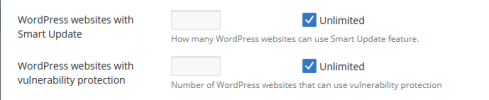
When we create the service plan, we can see the two options WordPress websites with Smart Update & WordPress websites with vulnerability protection. We are not using this options so is that possible to hide from the page where we create the service plan?

Awaiting your reply.
 

Attachments

  • disable wordpress vulnerability and smart update.png
    disable wordpress vulnerability and smart update.png
    16.3 KB · Views: 2
Add the following configuration under the [ext-wp-toolkit] section (or add the section if doesn't exist yet) in the /usr/local/psa/admin/conf/panel.ini file.

Code:
virtualPatchesFeature = false
showSmartUpdates = false
 
Back
Top