• The APS Catalog has been deprecated and removed from all Plesk Obsidian versions.
    Applications already installed from the APS Catalog will continue working. However, Plesk will no longer provide support for APS applications.
  • Please be aware: with the Plesk Obsidian 18.0.78 release, the support for the ngx_pagespeed.so module will be deprecated and removed from the sw-nginx package.

Question post_max_size and upload_max_size

JollyCasfer

New Pleskian
I don't know if this question is already answered but I just want to ask about how am I going to increase the post_max_size and upload_max_size of my php. I can't find the php.ini file and there's no available field for this update in my php settings. Thanks in advance
 
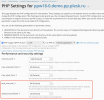
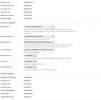
I just checked on Plesk Obsidian for Windows and I see these options in PHP Settings:

Screenshot 2020-12-03 at 15.39.53.png
 
Make sure that you have enabled subscription permissions for managing PHP settings.
 
Do you see the button "Change View" in the lower-left corner? If yes, choose Service Provider View and then in the left menu you will see Subscriptions button for the list of your subscriptions on the server. As result, you will be able to manage your subscriptions.
 
Do you see the button "Change View" in the lower-left corner? If yes, choose Service Provider View and then in the left menu you will see Subscriptions button for the list of your subscriptions on the server. As result, you will be able to manage your subscriptions.
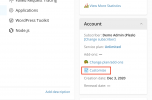
I don't see change view button. These are the buttons in my left panel
 

Attachments

  • left.JPG
    left.JPG
    19.3 KB · Views: 1
No, my username's kind of complicated. It's composed of 2 letters and several numbers. I haven't change it ever since.
 
In that case you need to contact the server administrator for more information and setting changes. This could be your hosting provider. You cannot make certain changes to subscriptions if you are not "admin".
 
Back
Top