@Janko Falli
The statement
So the issue is not that stapling cannot be enabled but it’s that the UI reflects configuration directives, not actual runtime capability, which can be misleading when the certificate lacks an OCSP responder URL.
is not entirely correct, in a number of ways.
First of all, Plesk GUI should not "read" Nginx config and can hence not "reflect" that Nginx config.
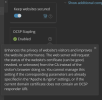
If and when you get a green "UI indicator" by adding lines to the "Additional Nginx directives" .... and it becomes grey (read: not activated) after a warning in the Nginx error logs, then the whole point is that Nginx logs have been read and Nginx config is not.
Nevertheless, I cannot assume that your statement is not true (why should I?), but I can state that Plesk GUI SHOULD NOT "read" Nginx config (let alone the Nginx config provided in the Additional Nginx directives) and consequently "think" that all is fine and that OCSP is activated.
The emphasis is on "should" - one would have to imagine a world where one can input something into Plesk and Plesk then considering it as "fine and ok" : well, it simply is not and should not be ok.
Secondly, OCSP stapling can be enabled and OCSP as a method can work, but not for Let's Encrypt ......... but OCSP stapling support has been terminated for Let's Encrypt : all Let's Encrypt OCSP responders have been shutdown as of August 6, 2025.
The latter has two implications, being that
1 - old LE certificates with OCSP cannot be checked against an OCSP responder : the Nginx directive ssl_stapling_verify on; will cause an error notification,
2 - new LE certificates are issued without OCSP : the Nginx directives ssl_stapling on; and ssl_stapling_verify on; will cause error notifications,
and hence, when using LE certificates, the ssl_stapling directives do not add value to the Nginx config, they only cause minor warnings.
However, even though the error notifications are warnings that can be ignored, it is highly recommend to remove all ssl_stapling directives from Nginx.
Thirdly, the actual confusing or misleading part of having a "enable OCSP button" in Plesk is simply the fact that this button should not be there, if and when working with LE certificates or other certificates that do not support OCSP stapling.
In my humble opinion, there are a lot of "bad things" in the Plesk GUI and SSL it! extension that can cause havoc when using and issuing new certificates.
This "OCSP button" is only one of them, a minor one ........... one that can safely be ignored, with time saved better spent on other certificate related issues.
In short, you might have - correctly - identified a number of issues with Plesk, being (amongst others) that
a) Plesk apparently "thinks" that deprecated configuration (such as OCSP stapling) can be activated,
b) Plesk apparently "thinks" that adding text related to deprecated configuration in "Additional Nginx directives" can activate that configuration (DANGER!!!),
c) Plesk apparently does not scan (combinations of) configuration for incapabilities (DANGER!!!!)
but you are - incorrect - by focusing on OCSP Stapling with LE certificates : the support therefore has ended already.
Nevertheless, I do want to thank you for pointing out how the lack of a simple test, being a script or lines of code focusing on
- disabling the OCSP stapling button when LE certificates are used, AND
- automatic renewal of LE certificates if they somehow contain OCSP rules, AND
- automated checks and tests of manual input in "Additional Nginx directives" (or "Additional Apache directives"), AND
- prevention of entries of aforementioned input that consists of directives that are related to deprecated config, AND
- prevention of entries of aforementiond input that can cause security issues (for instance when following online "advice"),
- and so on,
should be developed by Plesk Team and introduced as soon as possible.
Kind regards...
DISCLAIMER : I did not have a look into this matter, since a change in policy of development licenses requires me to spend more time on migrating Plesk test servers than I would like to spend. I did not test the "green OCSP button phantom". However, if and when this OCSP button shows as green due to a simple entry in Nginx config (via Addition Nginx directives or otherwise), then that would be highly ridiculous and extremely dangerous for those hosting providers that use Plesk GUI to allow their customers access to a hosting environment where Nginx directives can be added or augmented.

 Facebook
 Twitter