• We value your experience with Plesk during 2025
    Plesk strives to perform even better in 2026. To help us improve further, please answer a few questions about your experience with Plesk Obsidian 2025.
    Please take this short survey:

    https://survey.webpros.com/
  • On Plesk for Linux mod_status is disabled on upgrades to improve Apache security.
    This is a one-time operation that occurs during an upgrade. You can manually enable mod_status later if needed.

Question Prevent default creation of Plesk user when creating mailbox

Kaspar

API expert
Plesk Guru
Currently when creating a mailbox in Plesk the option "Can be used to log in to Plesk" is checked by default. Which for me isn't always preferable.
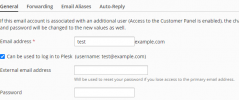
Schermafbeelding 2021-08-27 150127.png

Does anyone know if there is any setting to not have this option checked by default? An thus prevent the default creation of a Plesk user when creating a mailbox.
 
  • Like
Reactions: mow
Hello,
there is no known possibility to set it as default disabled in plesk, but you can run it via CLI:

Code:
plesk bin mail --create [email protected] -passwd "#_123244hjhdsf" -cp-access false -mailbox true
 
In fact, maybe you could use the Event Manager in Plesk: Create an event for "Mail account created"

Configure this event to execute plesk bin mail -u ${NEW_EMAIL} -cp-access false

Not sure if this will work, I haven't used Event Manager in a long time but may you'll have a look at the documentation:
and
 
Thnx @m3lezZ and @Monty, much apricated. However your suggestions will disable the mailbox user as Plesk user after it's already created. I am looking for an option to prevent a Plesk user being made in the first place when a new mailbox is created trough the GUI as a default. In some cases it might still be useful to have a mailbox user double as a Plesk user. So rather have this option checked by explicit choice of the user, not by default.

As a solution I've added this peace of Javascript to Plesk (in case anyone is interested).

JavaScript:
<script>
    let loginAsUser = document.getElementById("general-generalSection-loginAsUser");
    loginAsUser ? loginAsUser.checked = false : false;
</script>
 
Thnx @m3lezZ and @Monty, much apricated. However your suggestions will disable the mailbox user as Plesk user after it's already created. I am looking for an option to prevent a Plesk user being made in the first place when a new mailbox is created trough the GUI as a default. In some cases it might still be useful to have a mailbox user double as a Plesk user. So rather have this option checked by explicit choice of the user, not by default.

As a solution I've added this peace of Javascript to Plesk (in case anyone is interested).

JavaScript:
<script>
    let loginAsUser = document.getElementById("general-generalSection-loginAsUser");
    loginAsUser ? loginAsUser.checked = false : false;
</script>
how could i add this code?
 
How to keep the "Can be used to log in to Plesk" option unchecked when creating an email in Plesk.

First, enable the "extension upload" permission
1. https://support.plesk.com/hc/en-us/articles/12377006907031-How-to-edit-Plesk-panel-ini
2. Resolved - Upload Extension button is missing in My Extensions

Then, upload this extension Resolved - How to hide shutdown link in settings?

Then, open your SSH terminal and edit this file
nano /usr/local/psa/admin/htdocs/modules/global/global.js

Then add the following code and save it
document.addEventListener('DOMContentLoaded', function () {
const checkbox = document.querySelector(
'input#general-generalSection-loginAsUser[inlinedescription=" "]'
);

if (checkbox && checkbox.checked) {
checkbox.checked = false;
checkbox.removeAttribute('checked');
}
});
 
How to keep the "Can be used to log in to Plesk" option unchecked when creating an email in Plesk.

First, enable the "extension upload" permission
1. https://support.plesk.com/hc/en-us/articles/12377006907031-How-to-edit-Plesk-panel-ini
2. Resolved - Upload Extension button is missing in My Extensions

Then, upload this extension Resolved - How to hide shutdown link in settings?

Then, open your SSH terminal and edit this file


Then add the following code and save it
If anyone wants to disable completely, then use this JS code
document.addEventListener('DOMContentLoaded', function () {
const checkbox = document.getElementById('general-generalSection-loginAsUser');
if (checkbox) {
checkbox.checked = false;
checkbox.removeAttribute('checked');
checkbox.disabled = true;
checkbox.addEventListener('click', function (e) {
e.preventDefault();
return false;
});
}
});
 
Back
Top
