• The APS Catalog has been deprecated and removed from all Plesk Obsidian versions.
    Applications already installed from the APS Catalog will continue working. However, Plesk will no longer provide support for APS applications.
  • Please be aware: with the Plesk Obsidian 18.0.78 release, the support for the ngx_pagespeed.so module will be deprecated and removed from the sw-nginx package.

Question Redirect subdomain to folder

Hi FelixB,

here you go with some working examples, how to redirect correctly, using apache:

APACHE - NON-WWW - configuration:
Code:
RewriteEngine On
RewriteCond %{SERVER_PORT} !^80$
RewriteCond %{HTTP_HOST} !^(your-domain-OR-sub.domain\.com)?$
RewriteRule ^(.*)$ http://your-domain-OR-sub.domain.com/$1 /squirrelmail [R=301,L]

APACHE - WWW - configuration:
Code:
RewriteEngine On
RewriteCond %{SERVER_PORT} !^80$
RewriteCond %{HTTP_HOST} !^(www\.your-domain-OR-sub.domain\.com)?$
RewriteRule ^(.*)$ http://www.your-domain-OR-sub.domain.com/$1 /squirrelmail [R=301,L]

APACHE - NON-WWW - configuration - HTTPS:
Code:
RewriteEngine On
RewriteCond %{SERVER_PORT} !^443$
RewriteCond %{HTTP_HOST} !^(your-domain-OR-sub.domain\.com)?$
RewriteRule ^(.*)$ https://your-domain-OR-sub.domain.com/$1 /squirrelmail [R=301,L]

APACHE - WWW - configuration - HTTPS:
Code:
RewriteEngine On
RewriteCond %{SERVER_PORT} !^443$
RewriteCond %{HTTP_HOST} !^(www\.your-domain-OR-sub.domain\.com)?$
RewriteRule ^(.*)$ https://www.your-domain-OR-sub.domain.com/$1 /squirrelmail [R=301,L]


Pls. note, that IF you nginx as well, you have to add additional directives for nginx as well!!! ;)
 
Hi UFHH01,
thx for your post but for me and my Plesk Onyx Version 17.5.3 Update-Nr. 19 only the HTTP commands works.
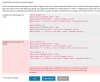
When i try to save the HTTPS commands i got an error:

Plesk-apache-rewriterules.png
Any ideas on that?

best regards,
Darkentik
 
Back
Top