• Debian 11 is approaching its end-of-life (vendor EOL date - August 31, 2026). Plesk Obsidian 18.0.80 will be the last release to support it.
    If you are running Plesk Obsidian on Debian 11, we recommend you upgrade those servers to Debian 12 using our dist-upgrade tool.
  • We plan to deprecate and remove the support for XML RPC protocol versions earlier than 1.6.9.1 in Plesk Obsidian 18.0.82. We strongly recommend that you update all existing integrations using earlier versions of the XML RPC protocol to comply with the version 1.6.9.1 specification.

Resolved Remote backup issue, can't create remote backup

domox

New Pleskian
Hi, everyone since November 24,2016 I'm having a issue with the backup manager. I have a remote backup server but Plesk make the remote connection (i guess) but not copy the backup.

I test the remote server and the password and user are ok the connection via ftp is successful but Plesk shows me a issue every time a try to connect.

See capture in the attached.error backup plesk.PNG
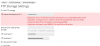
Can anyone help me?

I tried to google the issue but i didn't found any help.
 
Connection is not the problem here, the problem is writing files to the ftp target directory or to the temporary dump file directory on your local server. Have you tested that manually, too?

Please verify, too, that in /etc/psa/psa.conf the DUMP_D and DUMP_TMP_D directories are set to directories present on your local system and that these are writeable by psaadm user and group.
 
Connection is not the problem here, the problem is writing files to the ftp target directory or to the temporary dump file directory on your local server. Have you tested that manually, too?

Please verify, too, that in /etc/psa/psa.conf the DUMP_D and DUMP_TMP_D directories are set to directories present on your local system and that these are writeable by psaadm user and group.

My hero, Thanks, i had to create the tmp directory again, i dont know how was deleted maybe an update, but now my backups are working again.
 
Back
Top