• The new Python extension is now available. It allows customers to deploy and manage WSGI-based Python applications on their websites directly from Plesk.
  • The Plesk Mobile apps for iOS and Android and the Plesk Mobile Center extension have been deprecated, and are no longer available for new installations. In Plesk Obsidian 18.0.84, the Plesk Mobile Center extension will be removed from servers during the upgrade, and the Plesk Mobile apps will lose their server management features.
  • The Social Login extension has been deprecated and will be removed in Plesk Obsidian 18.0.84. After that, it will no longer be possible to log in to Plesk with a Google, Facebook, GitHub account, or with a passkey. Plesk usernames and passwords, as well as logging in with a WebPros Account, are not affected.

Resolved Remote backup issue, can't create remote backup

domox

New Pleskian
Hi, everyone since November 24,2016 I'm having a issue with the backup manager. I have a remote backup server but Plesk make the remote connection (i guess) but not copy the backup.

I test the remote server and the password and user are ok the connection via ftp is successful but Plesk shows me a issue every time a try to connect.

See capture in the attached.error backup plesk.PNG
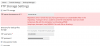
Can anyone help me?

I tried to google the issue but i didn't found any help.
 
Connection is not the problem here, the problem is writing files to the ftp target directory or to the temporary dump file directory on your local server. Have you tested that manually, too?

Please verify, too, that in /etc/psa/psa.conf the DUMP_D and DUMP_TMP_D directories are set to directories present on your local system and that these are writeable by psaadm user and group.

My hero, Thanks, i had to create the tmp directory again, i dont know how was deleted maybe an update, but now my backups are working again.
 
Back
Top