Follow along with the video below to see how to install our site as a web app on your home screen.
Note: This feature may not be available in some browsers.
Debian 11 is approaching its end-of-life (vendor EOL date - August 31, 2026). Plesk Obsidian 18.0.80 will be the last release to support it.
If you are running Plesk Obsidian on Debian 11, we recommend you upgrade those servers to Debian 12 using our dist-upgrade tool.
We plan to deprecate and remove the support for XML RPC protocol versions earlier than 1.6.9.1 in Plesk Obsidian 18.0.82. We strongly recommend that you update all existing integrations using earlier versions of the XML RPC protocol to comply with the version 1.6.9.1 specification.
I will use my old damaged Plesk Installation running on Ubuntu for DEMO (Proxmox QEMU):
1. Reboot Server
2. You should see GRUB Bootloader, Press "e"
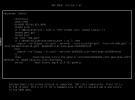
3. You need to add on the end of the line what beginns with "linux /boot/vmlinux-(...)" this: "init /bin/bash (See Screenshot: reset 2)
4. After step 3. Press F10 or Ctrl + x to Start.
5. You should have shell access as root now, before we can reset password, we need to mount the filesystem.
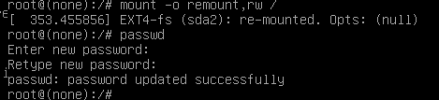
6. Type: "mount -o remount,rw /"
7. Now we can reset Root Password: "passwd" and Press enter
8. Type your desired password, it will ask twice.
9. Continue booting to normal with: "exec /sbin/init"
10. You should be able to log in now

 Facebook
 Twitter