
 Facebook
 Twitter
smbfission
New Pleskian
Hello, I hope someone can help me run a node.js app exclusively from a sub-directory on Plesk.
I am trying to run Ghost CMS (uses node.js) when accessed in a subdirectory only. I got Ghost CMS to work on Plesk (see the journey I went through here if interested: Cannot Install Ghost on Plesk Obsidian with Nods.js ) and was able to install it in a subdirectory.
Everything worked, except when configuring node.js on plesk, it seems that the Root domain (domainexample.com/) is configured to be the "application url"
so if you access domain.com, it will show "CANNOT GET /" if node.js is turned on.
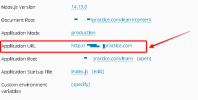
and I don't know how to make it so that my node.js app only loads from the subdirectory address, from the example above, domain.com/learn/
When I go to my root domain
I see this:
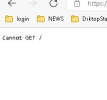
Which makes sense because node.js is saying my app url is the root domain, but the files are hosted in a different subdirectory.
I want so that if you go to the root domain (domain.com) that it shows the index.html file shown there.
If I turn off node.js, it will show the index.html file there after apache cache clears.
Thanks so much!
I am trying to run Ghost CMS (uses node.js) when accessed in a subdirectory only. I got Ghost CMS to work on Plesk (see the journey I went through here if interested: Cannot Install Ghost on Plesk Obsidian with Nods.js ) and was able to install it in a subdirectory.
Everything worked, except when configuring node.js on plesk, it seems that the Root domain (domainexample.com/) is configured to be the "application url"
so if you access domain.com, it will show "CANNOT GET /" if node.js is turned on.
and I don't know how to make it so that my node.js app only loads from the subdirectory address, from the example above, domain.com/learn/
When I go to my root domain
I see this:
Which makes sense because node.js is saying my app url is the root domain, but the files are hosted in a different subdirectory.
I want so that if you go to the root domain (domain.com) that it shows the index.html file shown there.
If I turn off node.js, it will show the index.html file there after apache cache clears.
Thanks so much!


