• The new Python extension is now available. It allows customers to deploy and manage WSGI-based Python applications on their websites directly from Plesk.
  • Debian 11 has reached its end-of-life (vendor EOL date - August 31, 2026). Plesk Obsidian 18.0.81 is the last release to support it.
    If you are running Plesk Obsidian on Debian 11, we recommend you upgrade those servers to Debian 12 using our dist-upgrade tool.
  • We plan to deprecate and remove the support for XML RPC protocol versions earlier than 1.6.9.1 in Plesk Obsidian 18.0.82. We strongly recommend that you update all existing integrations using earlier versions of the XML RPC protocol to comply with the version 1.6.9.1 specification.

Issue Node.js Manager shows 2 domains using Node.js 21, but domain list is empty

Azurel

Silver Pleskian
Server operating system version
AlmaLinux 9.8
Plesk version and microupdate number
18.0.81#3
Hi everyone, I have an issue with the Node.js Manager. In the Node.js Manager, version 21 shows 2 domains in the "Domains" column. This seems correct, as I can see Node.js listed under "Dev Tools" for two domains. However, when I open the "Domains" section in the Node.js Manager, the list is completely empty. See screenshots.

Node.js is no longer needed for these domains, and I would like to remove the Node.js configuration/association from them. How?

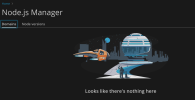
1792612092109.png
1792612105942.png
 
You can check all Plesk domains configured with Node.js 21.7.3 or older, including Node.js 20, 18, and earlier versions.

plesk db "
SELECT
d.name AS domain,
dp.val AS node_path
FROM domains d
JOIN dom_param dp ON d.id = dp.dom_id
WHERE dp.param = 'ext-nodejs-handlerPath'
AND CAST(
SUBSTRING_INDEX(
SUBSTRING_INDEX(dp.val, '/node/', -1),
'/', 1
) AS UNSIGNED
) <= 21
ORDER BY node_path, domain;
"
 
To disable Node.js on those domains:

plesk ext nodejs --disable -domain example.com
 
Back
Top