• Debian 11 is approaching its end-of-life (vendor EOL date - August 31, 2026). Plesk Obsidian 18.0.80 will be the last release to support it.
    If you are running Plesk Obsidian on Debian 11, we recommend you upgrade those servers to Debian 12 using our dist-upgrade tool.
  • We plan to deprecate and remove the support for XML RPC protocol versions earlier than 1.6.9.1 in Plesk Obsidian 18.0.82. We strongly recommend that you update all existing integrations using earlier versions of the XML RPC protocol to comply with the version 1.6.9.1 specification.

Scheduled Tasks 11.5 failing

TheHostingHeroes

Basic Pleskian
Hi,

When using Plesk 11.5's scheduled tasks (trying to call a website script via curl) I get "/usr/bin/curl: No such file or directory". This is a Scheduled task set on a subscription, not the admin account, so is this possibly related to a permissions issue when calling curl?

curl does exist on the server:
# which curl
/usr/bin/curl

Is there something I'm missing? - I've tried exactly how it shows at:
http://kb.parallels.com/en/115292 (/usr/bin/curl -sL http://domain.test/script.php >/dev/null)


EDIT:
I've got it working under the ROOT user, how can we get it working for the end user?
 
Last edited:
Hello,

Just checked that it is working fine on the newly created subscription. The info about my system:

[root@ppp115 ~]# plesk version
Product version: 11.5.30 Update #32
Update date: 2014/02/07 01:41
Build date: 2013/12/04 15:00
Build target: CentOS 6
Revision: 324178
Architecture: 64-bit
Wrapper version: 1.1

My steps:

1. Created test script with the content:
vim /var/www/vhosts/crontab.ru/httpdocs/script.php

<?php
phpinfo();
?>

2. Set permissions:
chmod 777 /var/www/vhosts/crontab.ru/httpdocs/script.php

3. Created the file to save output:
touch /var/www/vhosts/crontab.ru/httpdocs/out.txt
chmod 777 /var/www/vhosts/crontab.ru/httpdocs/out.txt

Checked that script runs every second:
Feb 18 07:26:01 ppp115 crond[1208]: (crontabuser) RELOAD (/var/spool/cron/crontabuser)
Feb 18 07:26:01 ppp115 CROND[9460]: (crontabuser) CMD (/usr/bin/curl -sL http://crontab.ru/script.php > /var/www/vhosts/crontab.ru/httpdocs/out.txt)
Feb 18 07:27:01 ppp115 CROND[9470]: (crontabuser) CMD (/usr/bin/curl -sL http://crontab.ru/script.php > /var/www/vhosts/crontab.ru/httpdocs/out.txt)
Feb 18 07:28:01 ppp115 CROND[9476]: (crontabuser) CMD (/usr/bin/curl -sL http://crontab.ru/script.php > /var/www/vhosts/crontab.ru/httpdocs/out.txt)
Feb 18 07:29:01 ppp115 CROND[9483]: (crontabuser) CMD (/usr/bin/curl -sL http://crontab.ru/script.php > /var/www/vhosts/crontab.ru/httpdocs/out.txt)
Feb 18 07:30:01 ppp115 CROND[9491]: (crontabuser) CMD (/usr/bin/curl -sL http://crontab.ru/script.php > /var/www/vhosts/crontab.ru/httpdocs/out.txt)
Feb 18 07:31:01 ppp115 CROND[9508]: (crontabuser) CMD (/usr/bin/curl -sL http://crontab.ru/script.php > /var/www/vhosts/crontab.ru/httpdocs/out.txt)

4. Got the output
du -sh /var/www/vhosts/crontab.ru/httpdocs/out.txt
56K /var/www/vhosts/crontab.ru/httpdocs/out.txt

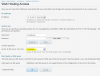
Check the settings on the screenshot also.
Capture.PNG

Capture1.PNG
 
Back
Top