• Halloween is coming! To celebrate the occasion, we dusted off a couple of old skins, and even created a brand new one (Pixel).
    To get into the festive spirit, install the Skins extension.
  • The new Python extension is now available. It allows customers to deploy and manage WSGI-based Python applications on their websites directly from Plesk.
  • The Plesk Mobile apps for iOS and Android and the Plesk Mobile Center extension have been deprecated, and are no longer available for new installations. In Plesk Obsidian 18.0.84, the Plesk Mobile Center extension will be removed from servers during the upgrade, and the Plesk Mobile apps will lose their server management features.
  • The Social Login extension has been deprecated and will be removed in Plesk Obsidian 18.0.84. After that, it will no longer be possible to log in to Plesk with a Google, Facebook, GitHub account, or with a passkey. Plesk usernames and passwords, as well as logging in with a WebPros Account, are not affected.

Scheduled Tasks 11.5 failing

TheHostingHeroes

Basic Pleskian
Hi,

When using Plesk 11.5's scheduled tasks (trying to call a website script via curl) I get "/usr/bin/curl: No such file or directory". This is a Scheduled task set on a subscription, not the admin account, so is this possibly related to a permissions issue when calling curl?

curl does exist on the server:
# which curl
/usr/bin/curl

Is there something I'm missing? - I've tried exactly how it shows at:
http://kb.parallels.com/en/115292 (/usr/bin/curl -sL http://domain.test/script.php >/dev/null)


EDIT:
I've got it working under the ROOT user, how can we get it working for the end user?
 
Last edited:
Hello,

Just checked that it is working fine on the newly created subscription. The info about my system:

[root@ppp115 ~]# plesk version
Product version: 11.5.30 Update #32
Update date: 2014/02/07 01:41
Build date: 2013/12/04 15:00
Build target: CentOS 6
Revision: 324178
Architecture: 64-bit
Wrapper version: 1.1

My steps:

1. Created test script with the content:
vim /var/www/vhosts/crontab.ru/httpdocs/script.php

<?php
phpinfo();
?>

2. Set permissions:
chmod 777 /var/www/vhosts/crontab.ru/httpdocs/script.php

3. Created the file to save output:
touch /var/www/vhosts/crontab.ru/httpdocs/out.txt
chmod 777 /var/www/vhosts/crontab.ru/httpdocs/out.txt

Checked that script runs every second:
Feb 18 07:26:01 ppp115 crond[1208]: (crontabuser) RELOAD (/var/spool/cron/crontabuser)
Feb 18 07:26:01 ppp115 CROND[9460]: (crontabuser) CMD (/usr/bin/curl -sL http://crontab.ru/script.php > /var/www/vhosts/crontab.ru/httpdocs/out.txt)
Feb 18 07:27:01 ppp115 CROND[9470]: (crontabuser) CMD (/usr/bin/curl -sL http://crontab.ru/script.php > /var/www/vhosts/crontab.ru/httpdocs/out.txt)
Feb 18 07:28:01 ppp115 CROND[9476]: (crontabuser) CMD (/usr/bin/curl -sL http://crontab.ru/script.php > /var/www/vhosts/crontab.ru/httpdocs/out.txt)
Feb 18 07:29:01 ppp115 CROND[9483]: (crontabuser) CMD (/usr/bin/curl -sL http://crontab.ru/script.php > /var/www/vhosts/crontab.ru/httpdocs/out.txt)
Feb 18 07:30:01 ppp115 CROND[9491]: (crontabuser) CMD (/usr/bin/curl -sL http://crontab.ru/script.php > /var/www/vhosts/crontab.ru/httpdocs/out.txt)
Feb 18 07:31:01 ppp115 CROND[9508]: (crontabuser) CMD (/usr/bin/curl -sL http://crontab.ru/script.php > /var/www/vhosts/crontab.ru/httpdocs/out.txt)

4. Got the output
du -sh /var/www/vhosts/crontab.ru/httpdocs/out.txt
56K /var/www/vhosts/crontab.ru/httpdocs/out.txt

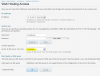
Check the settings on the screenshot also.
Capture.PNG

Capture1.PNG
 
Back
Top