Facebook
 Twitter
Oldiesmann
Basic Pleskian
TITLE:
Scheduled Tasks doesn't allow shorthand cron notation
PRODUCT, VERSION, OPERATING SYSTEM, ARCHITECTURE:Plesk Onyx
Version 17.8.11 Update #31
Ubuntu 18.04.1 LTS
x64
PROBLEM DESCRIPTION:Version 17.8.11 Update #31
Ubuntu 18.04.1 LTS
x64
If you want to run a cron job every x minutes/hours/days, etc., most sites say you can put */<number> in a spot. For instance, to run something every 5 minutes you can do "*/5 * * * *" instead of having to manually type out "0,5,10,15,20,25,30,35,40,45,50,55 * * * *". However, Plesk does not support this shorthand notation.
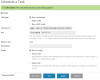
STEPS TO REPRODUCE:Go into Scheduled tasks and create a new task. Select "cron style" next to "run" and enter something like "*/5 * * * *" in the box.
ACTUAL RESULT:You receive an error saying that the format is invalid.
EXPECTED RESULT:Task should be saved and executed as expected.
ANY ADDITIONAL INFORMATION:Ubuntu does support this syntax. See Ubuntu Manpage: crontab - tables for driving cron for more info.
YOUR EXPECTATIONS FROM PLESK SERVICE TEAM:Confirm bug