Follow along with the video below to see how to install our site as a web app on your home screen.
Note: This feature may not be available in some browsers.
We value your experience with Plesk during 2025 Plesk strives to perform even better in 2026. To help us improve further, please answer a few questions about your experience with Plesk Obsidian 2025. Please take this short survey: https://survey.webpros.com/
On Plesk for Linux mod_status is disabled on upgrades to improve Apache security. This is a one-time operation that occurs during an upgrade. You can manually enable mod_status later if needed.
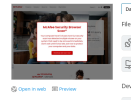
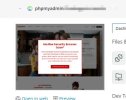
Could you please describe the issue in more detail? Your screenshot shows a McAfee website in the background (or a website that looks like a McAfee site) and a dialog in front. It's a screenshot of your website that is hosted on the server. This is not linked to phpMyAdmin in any way. It is also quite strange, because unless you are McAfee it is not likely that you have their content in your website. Maybe your website was hacked to impersonate their website and trick users into downloading files?
I'm not a programmer to give you more technical details.
All I can say is that I get alerts as the server's CPU is running at 100% for a long period, that the website goes offline and comes back randomly.
All started by some wordpress scripts that were introduced on the server that I was able to clean up.
Your reply confort me in the fact that I'm seeing the same thing than you: the McAfee screenshot instead of my phpmyadmin preview.
Here is a larger picture:
Meanwhile, my website was displaying the same image. Hopefully, I could restore it from a backup from this morning.
I'm now about to upgrade Prestashop to hopefully overwrite damaged files.
I need some assistance in securing the website. I'll be greatful if you can advise me a serious person/structure that can take the job in charge.
I did not actually look at your website (because I do not know your website, it is not mentioned in your posts). I only saw that the screenshot generator of Plesk captured a screenshot that is obviously not your website. I also did not understand that you must have created your own subdomain "phpmyadmin" with the intention to put your own phpMyAdmin onto it. Why not simply use the phpMyAdmin that comes with the webserver and is readily available for use in the "Databases" menu?
My guess is that your website was hacked and that a hacker shows a spoofed McAfee website instead of your real content. Replacing your website content with a fresh copy of whatever you wanted to install there should solve that.