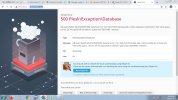
DigitalSplendid Regular Pleskian Mar 8, 2021 #1 35.173.51.8:8443 showing Server Error instead of box for entering Plesk login credentials. Attachments 500p.jpg 222.9 KB · Views: 8
IgorG Plesk addicted! Plesk Certified Professional Mar 8, 2021 #2 MySQL service can't start because of "No space left on device". Have you checked it with # df -h and clear disk space?
MySQL service can't start because of "No space left on device". Have you checked it with # df -h and clear disk space?
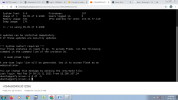
DigitalSplendid Regular Pleskian Mar 9, 2021 #3 @IgorG Thanks for the reply. How do I check: Using EC2 Instance Connect? If so, I typed # df -h but no output. How do I clear disk space? Thanks!! Attachments EC2.png 104.9 KB · Views: 6
@IgorG Thanks for the reply. How do I check: Using EC2 Instance Connect? If so, I typed # df -h but no output. How do I clear disk space? Thanks!!
IgorG Plesk addicted! Plesk Certified Professional Mar 9, 2021 #4 DigitalSplendid said: # df -h but no output. Click to expand... # symbol indicates a command-line prompt for the root user. It does not need to be entered. DigitalSplendid said: How do I clear disk space? Click to expand... Delete all unnecessary files and directories with large size. Or ask your server administrator to increase the disk space for your server.
DigitalSplendid said: # df -h but no output. Click to expand... # symbol indicates a command-line prompt for the root user. It does not need to be entered. DigitalSplendid said: How do I clear disk space? Click to expand... Delete all unnecessary files and directories with large size. Or ask your server administrator to increase the disk space for your server.