
 Facebook
 Twitter
- Server operating system version
- Ubuntu 22.04
- Plesk version and microupdate number
- -
I am trying to set up the Shopware SMTP Mailer. Shopware and Plesk are not on the same server!
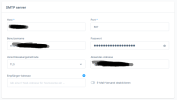
Using TLS as as encryption method I'm occuring following error with the SMTP Mailer provided by Symfony:

The domain has no certificate for mail encryption at the moment; but even with having it there's still this error.
Tools > TLS/SSL-Certificates looks like following:

Using "No encryption" in Shopware there is no error. The email gets send.
Does anyone have an idea how to fix that issue?
Using TLS as as encryption method I'm occuring following error with the SMTP Mailer provided by Symfony:
The domain has no certificate for mail encryption at the moment; but even with having it there's still this error.
Tools > TLS/SSL-Certificates looks like following:
Using "No encryption" in Shopware there is no error. The email gets send.
Does anyone have an idea how to fix that issue?

