Follow along with the video below to see how to install our site as a web app on your home screen.
Note: This feature may not be available in some browsers.
The APS Catalog has been deprecated and removed from all Plesk Obsidian versions. Applications already installed from the APS Catalog will continue working. However, Plesk will no longer provide support for APS applications.
Please be aware: with the Plesk Obsidian 18.0.78 release, the support for the ngx_pagespeed.so module will be deprecated and removed from the sw-nginx package.
Plesk never reboots the server unless you click that option in the "Server Management" section. You can try to find the cause for the reboots in /var/log/messages.
I have also noticed this.
I see that message every day actually. If i logon Plesk at 08:00, the message is displayed as server restarted at 08:00.
Just once a day however, if i login again later i don't see the message. This continues every day
Can you check the actual uptime of the server? I used to get this message also but the server was not in fact restarted, I assumed then that it was the log feature itself that was restarted.
Let's assume that the issue is with the interpretation of a log entry. This used to be solved before, but from your description the case is rather obvious. I've asked developers whether they want to continue PPS-13803 / EXTPLESK-4217 / EXTPLESK-4463 or whether we file a new case. Either way, it will be taken care of.
Just a small clarification, a time near a notification is the time when the notification was generated and added into Plesk; it is not time when the server was (re)booted. A new notification is generated if a server was (re)booted after the date of previous detected (re)boot. In other words, a notification is appear if server was rebooted since previous Admin login.
We have a task in our backlog to improve the text of notification with adding date and time of reboot to provide details on how long time ago the reboot was happened.
It only means that a new reboot was detected since previous notification. Datetime of reboot and datetime of notification appearance of definitely different; currently, Plesk shows datetime of notification (equal datetime of admin login to Plesk), not reboot.
I can't say that it is a false-positive alarm, if you have not expected a reboot event, makes sense to search for some additional data what is happened in the period between this and previous Plesk Admin's logins.
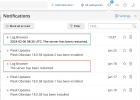
Just want to let you know about the latest small update of the Log Browser extension. To avoid misleading about the datetime of the reboot, the extension shows the exact date of the reboot in notification subject,
Note: "red" - before the update; "green" - after the update.
1.6.8 (02 February 2024)
[+] Notifications about rebooting now contain the reboot date. (EXTPLESK-4170)
Since this small fix is delivered and if you don't mind, let's decide that we have received the answer and solution from the dev.team (=> "Resolved").
If someone again face with an issue like a false-positive reboot alarm from of the Log Browser extension, feel free to create a new thread with new details and we will investigate what was happened.