Follow along with the video below to see how to install our site as a web app on your home screen.
Note: This feature may not be available in some browsers.
We value your experience with Plesk during 2025 Plesk strives to perform even better in 2026. To help us improve further, please answer a few questions about your experience with Plesk Obsidian 2025. Please take this short survey: https://survey.webpros.com/
On Plesk for Linux mod_status is disabled on upgrades to improve Apache security. This is a one-time operation that occurs during an upgrade. You can manually enable mod_status later if needed.
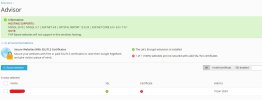
I am getting this kind of error and tried to reissue from let's encrypt, it's not getting fixed not sure why got only SSL in green without proper certificate
The green SSL checkmark on this page means that SSL via Let's Encrypt is available. It does not mean that a valid certificate has been issued. The red checkmark indicates that the certificate could not be issued.
Please try to issue the certificate manually through the extension. It will display an error message with "Details" that explains why the cert cannot be issued.