• The new Python extension is now available. It allows customers to deploy and manage WSGI-based Python applications on their websites directly from Plesk.
  • The Plesk Mobile apps for iOS and Android and the Plesk Mobile Center extension have been deprecated, and are no longer available for new installations. In Plesk Obsidian 18.0.84, the Plesk Mobile Center extension will be removed from servers during the upgrade, and the Plesk Mobile apps will lose their server management features.
  • The Social Login extension has been deprecated and will be removed in Plesk Obsidian 18.0.84. After that, it will no longer be possible to log in to Plesk with a Google, Facebook, GitHub account, or with a passkey. Plesk usernames and passwords, as well as logging in with a WebPros Account, are not affected.

Issue SSL/TSL error after updating to PLESK Version 18.0.72 Update #2

kenthan

New Pleskian
Server operating system version
Amslimux 8
Plesk version and microupdate number
18.0.72 Update #2
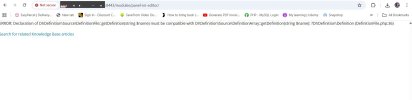
When click on SSL/TSL in plesk, the following error shows

ERROR: Declaration of DI\Definition\Source\DefinitionFile::getDefinition(string $name) must be compatible with DI\Definition\Source\DefinitionArray::getDefinition(string $name): ?DI\Definition\Definition (DefinitionFile.php:36)
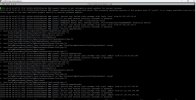
 
@kenthan , is that server indeed running Plesk Obsidian 18.0.72 Update 2? If not, I would suggest updating to the latest version. If the issue still continues temporarily enable Plesk debug mode, replicate the issue and re-check the /var/log/plesk/panel.log file for additional entries.
 
More ideas:

The screenshot mentions update errors. It is possible that you see the correct version in the GUI, but an update was never fully completed. You could try to manually run the Plesk update again. It will just overwrite missing parts.

Further, the "invalid updateTicket" can mean that the licensing server cannot be reached (in GUI retrieve license keys again and see if that works), it could also mean that a firewall blocks port 5224 or for some other reason ka.plesk.com cannot be accessed.

The first lines of the screenshot hint that your operating system might not be supported. You wrote "AmsLimux 8", and probably everything thinks "Alma Linux", but are you sure you have a valid installation of Alma 8? Or could it be that this is only a similar environment? What else could prompt the autoinstaller script to think that it is not running on a valid platform? What's different on your system from a regular Alma 8 operating system?
 
Back
Top