• The APS Catalog has been deprecated and removed from all Plesk Obsidian versions.
    Applications already installed from the APS Catalog will continue working. However, Plesk will no longer provide support for APS applications.
  • Please be aware: with the Plesk Obsidian 18.0.78 release, the support for the ngx_pagespeed.so module will be deprecated and removed from the sw-nginx package.

Support area broken after switching to zendesk

danami

Silver Pleskian
TITLE:
Support area broken after switching to zendesk
PRODUCT, VERSION, OPERATING SYSTEM, ARCHITECTURE:
website
PROBLEM DESCRIPTION:
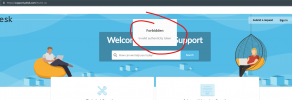
When you try to sign up for support or use the forgot password

Forbidden
Invalid authenticity token​
STEPS TO REPRODUCE:
Try to signup or use the forgot password here:

Plesk Help Center
ACTUAL RESULT:
It errors with "Invalid authenticity token".​
EXPECTED RESULT:
It should work as expected.​
ANY ADDITIONAL INFORMATION:
YOUR EXPECTATIONS FROM PLESK SERVICE TEAM:
Help with sorting out
 

Attachments

  • bug.png
    bug.png
    87.5 KB · Views: 10
Not sure that Plesk Support operation is in Plesk Forum responsibility. I would suggest you forward your question to Support Chat here Plesk Help Center
 
Not sure that Plesk Support operation is in Plesk Forum responsibility. I would suggest you forward your question to Support Chat here Plesk Help Center

IgorG I can't forward my question to the support area because it requires that you signup to create an account which is currently broken.. (what I'm trying to report to you guys).
 
Looks like that problem was resolved for you by Plesk Support Team.
 
Back
Top