• The new Python extension is now available. It allows customers to deploy and manage WSGI-based Python applications on their websites directly from Plesk.
  • The Plesk Mobile apps for iOS and Android and the Plesk Mobile Center extension have been deprecated, and are no longer available for new installations. In Plesk Obsidian 18.0.84, the Plesk Mobile Center extension will be removed from servers during the upgrade, and the Plesk Mobile apps will lose their server management features.
  • The Social Login extension has been deprecated and will be removed in Plesk Obsidian 18.0.84. After that, it will no longer be possible to log in to Plesk with a Google, Facebook, GitHub account, or with a passkey. Plesk usernames and passwords, as well as logging in with a WebPros Account, are not affected.

Resolved Traffic and disk usage update

spip

Basic Pleskian
Server operating system version
AlmaLinux 9.6 (Sage Margay)
Plesk version and microupdate number
18.0.72 #3
Hello,

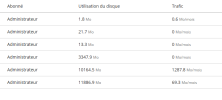
In my domain list, traffic and disk space usage are not updated automatically every day.

1759857844282.png

Thank you for your help,
 
Hello, @spip
The issue you described is Plesk bug PPPM-15074, that fixed in Plesk version 18.0.73
https://docs.plesk.com/release-notes/obsidian/change-log/
Fixed the issue where the amount of traffic consumed by domains was not being updated on the “Domains” page. (PPPM-15074)
To resolve the issue try to update Plesk, refer this article for setails How to upgrade Plesk to the next release

Please note that traffic and disk space usage is updating during daily maintenance task. So after Plesk be upgraded to 18.0.73 you should wait for daily maintenance task execution.
To force usage updating after the Plesk upgrade , connect via SSH as root and execute
# plesk daily -f ExecuteStatistics
Hello,
Thank you very much for this information. I'm going to update Plesk. Have a nice day
 
Back
Top