• The APS Catalog has been deprecated and removed from all Plesk Obsidian versions.
    Applications already installed from the APS Catalog will continue working. However, Plesk will no longer provide support for APS applications.
  • Please be aware: with the Plesk Obsidian 18.0.78 release, the support for the ngx_pagespeed.so module will be deprecated and removed from the sw-nginx package.

Issue Unable to delete a Host/Network in File Server extension

Polsys

New Pleskian
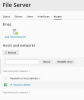
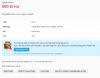
When I attempt to delete an existing Network or host address from the section "Access" in the File Server Extension, a 500 error appears and the Network remains activated. The Repair Kit doesn't help in any way.

delete.pngerror.png
 
This is known issue PPPM-11383.

As a temporary fix for Plesk Obsidian, replace modules.fileserver.user.delete.php file:
  1. Connect to the server via SSH.
  2. Backup the modules.fileserver.user.delete.php file:
# cp /usr/local/psa/admin/plib/modules/fileserver/ui/modules.fileserver.user.delete.php /usr/local/psa/admin/plib/modules/fileserver/ui/modules.fileserver.user.delete.php.bk
  1. Download the hotfix file (attached):
# unzip modules.fileserver.user.delete.zip
  1. Replace the file with the fixed one:
# mv /root/modules.fileserver.user.delete.php /usr/local/psa/admin/plib/modules/fileserver/ui/modules.fileserver.user.delete.php
 

Attachments

  • modules.fileserver.user.delete.zip
    2.8 KB · Views: 2
Thanks @IgorG for your answer. This file doesn't fix the problem with deleting Networks (inside Access label) but for removing Users. I suppose it's a similar issue. Could you share a version for Networks?

Besides, I have made another test trying to delete a Share and this problem also appears.

Thanks!
 
I have updated mentioned bugreport with your case. Let's wait fix in one of the nearest Plesk updates.
 
Back
Top