Follow along with the video below to see how to install our site as a web app on your home screen.
Note: This feature may not be available in some browsers.
We value your experience with Plesk during 2025 Plesk strives to perform even better in 2026. To help us improve further, please answer a few questions about your experience with Plesk Obsidian 2025. Please take this short survey: https://survey.webpros.com/
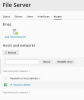
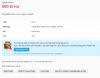
When I attempt to delete an existing Network or host address from the section "Access" in the File Server Extension, a 500 error appears and the Network remains activated. The Repair Kit doesn't help in any way.
Thanks @IgorG for your answer. This file doesn't fix the problem with deleting Networks (inside Access label) but for removing Users. I suppose it's a similar issue. Could you share a version for Networks?
Besides, I have made another test trying to delete a Share and this problem also appears.