• The APS Catalog has been deprecated and removed from all Plesk Obsidian versions.
    Applications already installed from the APS Catalog will continue working. However, Plesk will no longer provide support for APS applications.
  • Please be aware: with the Plesk Obsidian 18.0.78 release, the support for the ngx_pagespeed.so module will be deprecated and removed from the sw-nginx package.

Unable to set up Folder Access Permissions

ChrisHet

New Pleskian
I need to modify some access permissions for users, but all of the permission settings are disabled (or grayed out) and I am not able to change them. I tried logging in as a site user and admin, but still wasn't able to set any.

Please help.
 
See a screenshot I have attached.
If you mean these grayed permissions, you can modify it for Role only - click on the [edit] link.
 

Attachments

  • user-perm.png
    user-perm.png
    73.2 KB · Views: 7
Hi. Thanks for your reply.

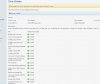
As you can see in the attachments, I've granted all permissions for the user, but still unable to change the permission to the folders.
 

Attachments

  • permission1.jpg
    permission1.jpg
    207.5 KB · Views: 5
  • permission2.jpg
    permission2.jpg
    95.5 KB · Views: 5
Back
Top