Resolved Unable to Upload SSL Certificate in Plesk from IONOS (Ubuntu 20.04 VPS)

perPlesk

New Pleskian
Server operating system version
Ubuntu 20.04 LTS
Plesk version and microupdate number
18.0.53 Update #2, last updated on June 24, 2023 05:27 PM
I recently purchased a domain from IONOS and set up a small VPS server running Ubuntu 20.04. Following the provided tutorial by IONOS, I installed Plesk through SSH and accessed the admin GUI successfully. However, I encountered an issue when attempting to upload the SSL certificate provided by IONOS (it has a *.key filetype).
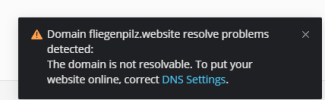
1687633183111.png

I have already confirmed that the domain has a DNS record, and I added the appropriate A Record in the IONOS DNS settings. Despite these configurations, I am still unable to upload the SSL certificate.

1687633163563.png

I would greatly appreciate any guidance or suggestions to resolve this issue. Thank you in advance!
 
After a new domain registration it can take a few hours until the DNS data has been propagated. Currently, the website is accessible, hence the SSL certificate can be issued.

Besides, is there a specific reason why you do not want to use the built-in Let's Encrypt capability to create and auto-renew free certificates?
 
After a new domain registration it can take a few hours until the DNS data has been propagated. Currently, the website is accessible, hence the SSL certificate can be issued.

Besides, is there a specific reason why you do not want to use the built-in Let's Encrypt capability to create and auto-renew free certificates?
Thanks. I have noticed it this mornig. I tried again and it worked, indeed.

The reason I'm not using the built-in Let's Encrypt capability is simply because I purchased/rented the domain from IONOS and it came with this certificate.
Since I'm new to all this... Am I understanding correctly that I don't have to use this SSL Certificate by the Domain-reseller and can use the Let's Encrypt built in Certificate as a "stand alone" ?
 
Am I understanding correctly that I don't have to use this SSL Certificate by the Domain-reseller and can use the Let's Encrypt built in Certificate as a "stand alone" ?
Yes, that is correct. You can stay independent from a specific vendor and simply use the built-in "Let's Encrypt" and "SSLIt" extensions to automate this for free.
 
Yes, that is correct. You can stay independent from a specific vendor and simply use the built-in "Let's Encrypt" and "SSLIt" extensions to automate this for free.

Sorry for writing here, maybe i need to open a new post.

If you use Let's Encrypt, Don't you need to delegate the DNS managemente on Plesk? If not the _acme-challenge TXT record won't be updated automatically and the certificate won't be issued. I am having this problem right now so i tried to create ns1.mydomain.com and ns2.mydomain.com subdomains and add them as DNS Servers, but it does not work.

Customer service from IONOS told me that I need a second IP for my VPS in order to do this but I am not sure if this is correct.

Is there any way to solve this? I can add the record manually but I will have to update it manually again in 3 months for the automatic renewal...
 
Only for wildcard certificates you'll need the TXT record. Normal certificates use the HTTP-01 authentication method. That does not require a DNS entry.
 
SO
Ubuntu 20.04.6 LTS
Producto
Plesk Obsidian
Versión 18.0.58 Actualización 2, última actualización el 2/Feb/2024 01:19
Hello, I don't know if anyone has been able to solve the problem of renewing the Let's Encrypt certificates on the Ionos VPS?
I have an Ionos VPS server with multiple domains and I only use Let's Encrypt certificates, but unfortunately I don't know how to get them to renew automatically and I have to manually renew them every 3 months.
If anyone can help me, I would be very grateful, at Ionos they tell everyone that having two IP addresses can be done and now since they have made IPV6 free on Ionos, I don't know if it will be the time to try it?
 
Back
Top