• Debian 11 is approaching its end-of-life (vendor EOL date - August 31, 2026). Plesk Obsidian 18.0.80 will be the last release to support it.
    If you are running Plesk Obsidian on Debian 11, we recommend you upgrade those servers to Debian 12 using our dist-upgrade tool.
  • We plan to deprecate and remove the support for XML RPC protocol versions earlier than 1.6.9.1 in Plesk Obsidian 18.0.82. We strongly recommend that you update all existing integrations using earlier versions of the XML RPC protocol to comply with the version 1.6.9.1 specification.

Issue updates stopped showing on panel

stevemartin

Basic Pleskian
updates are not showing in panel to update latest version
my last update was
OS: ‪CentOS Linux 7.7.1908 (Core)‬
Product: Plesk Obsidian 18.0.21 , last updated at Dec 1, 2019

how to update to latest version i cont see in panel for new updates showing
 
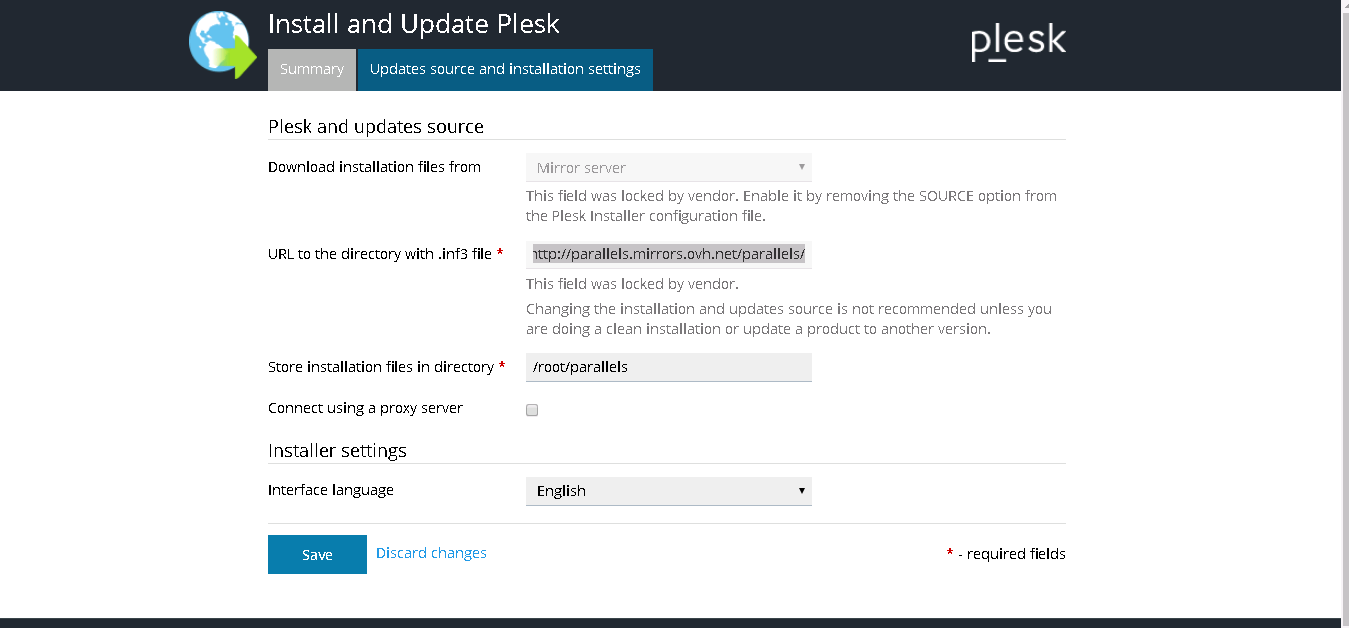
What about these settings? Do you have enabled official Plesk updates server there?

Screenshot 2020-03-25 at 13.48.17.png
 
f533ddb16e2687542be5b72ded425169.png


i dont have option to enable its not highlight
 
As I expected, you have provider's mirror enabled. Contact your Service provider to update mirror with the latest versions of the Plesk.
 
its been 6days no response from them ovh support is very bad from years.. how to change manually will it creates problem if i change source

even i tried to run command
plesk sbin autoinstaller
WARNING: Ignored deprecated parameter in Plesk Installer's configuration file: 'SOURCE_TYPE' = 'network'

BUSY: Update operation was locked by another update process.
exit status 1
 
Back
Top