Follow along with the video below to see how to install our site as a web app on your home screen.
Note: This feature may not be available in some browsers.
The APS Catalog has been deprecated and removed from all Plesk Obsidian versions. Applications already installed from the APS Catalog will continue working. However, Plesk will no longer provide support for APS applications.
Please be aware: with the Plesk Obsidian 18.0.78 release, the support for the ngx_pagespeed.so module will be deprecated and removed from the sw-nginx package.
This message indicates Plesk is running the update process. I am not sure, but maybe that causes the upload problem? Any way, let it run for a while (a couple of hours), see what happens afterwards.
It looks like FTP is an option in this case. However, the other issue I am having is I am unable to update Plesk via Tools and Settings. Could this be a firewall issue?
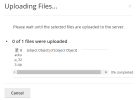
I see your initial zip file is 1,5GB in size. I can imaging such a large file might take some time to upload (depending on your connection of course). Perhaps the Plesk session expired in the mean time? Which requires you to login again if you refresh the page. You could try to set a longer session time (Tools & settings > Session Idle Time)
Because I had issues, I decided to install Ubuntu and then install Plesk on it to see if I kept having the same issues. This was a fresh install, so I did not lose anything.