• The new Python extension is now available. It allows customers to deploy and manage WSGI-based Python applications on their websites directly from Plesk.
  • The Plesk Mobile apps for iOS and Android and the Plesk Mobile Center extension have been deprecated, and are no longer available for new installations. In Plesk Obsidian 18.0.84, the Plesk Mobile Center extension will be removed from servers during the upgrade, and the Plesk Mobile apps will lose their server management features.
  • The Social Login extension has been deprecated and will be removed in Plesk Obsidian 18.0.84. After that, it will no longer be possible to log in to Plesk with a Google, Facebook, GitHub account, or with a passkey. Plesk usernames and passwords, as well as logging in with a WebPros Account, are not affected.

Input Warning: ‘Delete Database’ Button Too Close to phpMyAdmin in Latest Plesk Update

FErnandox2

New Pleskian
In the new Plesk update, in the Database Management section you’ve placed the “Delete Database” button very close to phpMyAdmin. Although it might seem convenient, it’s actually quite dangerous—when you’re in a hurry you could click it by mistake. Even with a confirmation popup, it remains a serious risk.


It would be better to group it under the other less-used options. After all, nobody is constantly deleting databases—in fact, we try to avoid it whenever possible.


I hope you find my suggestions useful and consider making this change. Thanks!phpmyadmin-btn.jpg
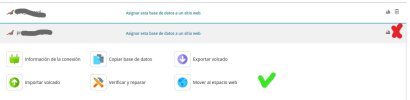
 
Hello, @FErnandox2 . Thank you for your feedback. Our team released an update yesterday (Plesk Obsidian 18.0.69 Update 2), which returned the phpMyAdmin button back to the database card (the area with the green checkmark).

Regarding the icons at the upper-right corner, at this point, they will remain as they are because this aligns better with the elements used in Dynamic List view in terms of consistency with the rest of the Plesk interface.
 
Back
Top