Resolved We're sorry, but something went wrong.

Solarom

New Pleskian
Hello,

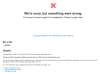
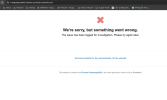
I am trying to deploy a NodeJS application on my server, but an error message appears.
I tested several solutions found on the web, but none worked.

error.PNG

Can you help me understand please ?

Thanks! :)
 
Sorry, but the only statement "It doesn't work! Please help!" is not enough.
Could you please be more specific? Any additional details, error messages from logs, results of troubleshooting, etc?
 
Okay, I have pull a NodeJS application from my remote repository.
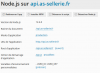
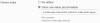
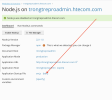
I configured the NodeJS extension like this.

node.PNG

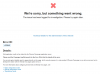
Only, when I wish to access my domain: "api.as-sellerie.fr", an error appears with the code "c61ecbaf".

error.PNG

In the domain logs, an error 500 :

500.PNG

Honestly, I'm a brand new Plesk customer and I use Google Translate to communicate in English, lol.

If you have an idea, or a hypothesis, I am interested. I keep looking for the answer to the problem in the meantime, and come back to you if I have an idea.

Kings regards :)
 
It's possible not to use phusion passenger?

EDIT :

I found the logs :

[Wed Apr 01 01:32:46.549460 2020] [autoindex:error] [pid 444:tid 140497834174208] [client 192.168.1.1:56202] AH01276: Cannot serve directory /var/www/vhosts/as-sellerie.fr/api.as-sellerie.fr/: No matching DirectoryIndex (index.html,index.cgi,index.pl,index.php,index.xhtml,index.htm,index.shtml) found, and server-generated directory index forbidden by Options directive


I tried this, it didn't work
app.PNG
 
Last edited:
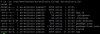
# ls -la /var/www/vhosts/as-sellerie.fr/api.as-sellerie.fr/


OUTPUT

terminal.JPG
_____________________________________________________________________________________________
*****************************************************************************************************

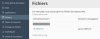
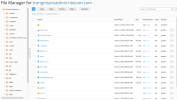
In the file manager, I clicked on "as-sellerie.fr".

first.jpg

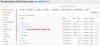
Then I go to the files for my subdomain and i add the file .htaccess.

second.jpg

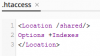
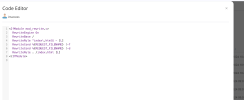
I configure the .htaccess file like this.

htaccess.PNG

My website appears with an error 500.

error.JPG

Here is the log.

[Wed Apr 01 16:34:04.627038 2020] [core:alert] [pid 19115:tid 140497996625664] [client 192.168.1.1:57794] /var/www/vhosts/as-sellerie.fr/api.as-sellerie.fr/.htaccess: <Location not allowed here
 
BUG FIXED

I found the answer to the problem. I deleted the .htaccess file, there was no report.

PhusionPassenger did not detect the startup file "app.js".
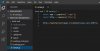
For the proper functioning of the application you must create a file server.js which creates a server by pointing your file app.js.

nodejs.JPG

Do not specify listening on a strict number as I have been able to do.

For example, for PhusionPassenger to work, write:

http.createServer(app).listen(process.env.PORT);

And not :

http.createServer(app).listen(5000);

________________________________________________________________________________________________________
*********************************************************************************************************

Thank you Igor for the time you spent trying to find a solution. I hope my post will help other users.

Thank you.
 
BUG FIXED

I found the answer to the problem. I deleted the .htaccess file, there was no report.

PhusionPassenger did not detect the startup file "app.js".
For the proper functioning of the application you must create a file server.js which creates a server by pointing your file app.js.

View attachment 16645

Do not specify listening on a strict number as I have been able to do.

For example, for PhusionPassenger to work, write:

http.createServer(app).listen(process.env.PORT);

And not :
http.createServer(app).listen(5000);

________________________________________________________________________________________________________
*********************************************************************************************************

Thank you Igor for the time you spent trying to find a solution. I hope my post will help other users.

Thank you.

Thank you! this works perfect
 
I have the same error
unnamed.png
my project is vuejs, after npm run build i push the created dist folder to plesk. Originally Application Startup File pointed to App.js I changed it to sw.js

Screenshot 2024-11-13 at 10.46.32.png

To be sure, create a .htaccess file in the dist folder.
Screenshot 2024-11-13 at 10.59.41.png
Contents of .htaccess file
Screenshot 2024-11-13 at 10.59.51.png
<IfModule mod_rewrite.c>
RewriteEngine On
RewriteBase /
RewriteRule ^index\.html$ - [L]
RewriteCond %{REQUEST_FILENAME} !-f
RewriteCond %{REQUEST_FILENAME} !-d
RewriteRule . /index.html [L]
</IfModule>
 
Back
Top