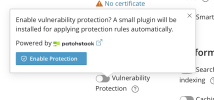
Question What is installing the WP toolkit plugin?

Martijn_mb

New Pleskian
Server operating system version
AlmaLinux 9.8
Plesk version and microupdate number
Plesk Obsidian v18.0.77
Hi,

We noticed that on one of our servers with Plesk, a lot of sites have the WP toolkit installed as a MU-plugin. Removing it only helps for a moment. It gets automatically re-installed.
We don't want it installed. When uninstalling, it says it will reinstall if certain features are used, but it fails to mention what those features are.
 
If you have Wordpress Toolkit installed and the site is managed through it, that will be installed each time maintenance is done. You can stop it from happening by adding the following in your Panel.ini file:

INI:
[ext-wp-toolkit]
installIntegrationPluginToNewSites = false
rolloutIntegrationPluginToExistingSites = false
integrationPluginApi = false
integrationPluginUiModuleEnabled = false
integrationPluginEventModuleEnabled = false

Alternatively you could detach the site from wordpress toolkit or if you don't use it you can always uninstall wordpress toolkit.
 
it fails to mention what those features are.
At the moment it's only Vulnerability Protection and what we call "reactivity" (meaning if a change related to plugins or themes happens inside WordPress, WPT will know about it immediately w/o having to wait for maintenance task). If you have plugin installed, login to WordPress from WPT will use one-time token-based links instead of passwords, so you won't need to remember the username/password. A new security measure added in WPT v6.12 (not out yet) will only work if a plugin is installed (so enabling this measure will install the plugin). Certain upcoming features like real-time backup will only work if a plugin is installed (this depends on whether we need some code to exist within WordPress for the feature to work).
 
Back
Top