• Debian 11 is approaching its end-of-life (vendor EOL date - August 31, 2026). Plesk Obsidian 18.0.80 will be the last release to support it.
    If you are running Plesk Obsidian on Debian 11, we recommend you upgrade those servers to Debian 12 using our dist-upgrade tool.
  • We plan to deprecate and remove the support for XML RPC protocol versions earlier than 1.6.9.1 in Plesk Obsidian 18.0.82. We strongly recommend that you update all existing integrations using earlier versions of the XML RPC protocol to comply with the version 1.6.9.1 specification.

Question Why does my cloud instance with 30Go RAM fulfill its cache memory in less than 6 hours?

Teal_cfr

Basic Pleskian
Hi,

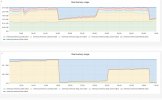
As you can see on that stats.
One of my servers hit its maximum memory capacity in less than 6 hours.

So I have to clean memory if I don't want to see all my websites getting slow like the hell.


Bash:
$ sync; echo 3 > /proc/sys/vm/drop_caches
$ swapoff -a
$ swapon -a

Any solution to resolve this permanently?
 

Attachments

  • problem_memory usage srv.jpg
    problem_memory usage srv.jpg
    234.8 KB · Views: 7
The permanent solution is: Don't touch it, this is how Linux works. Caches are used so that applications don't have to read from filesystem, which is always slower than reading from memory. Have a look at: Help! Linux ate my RAM!

If you want to know how much memory the server really has, look at the "available" column when you run a free -m

- Use htop and click on the CPU% column to find out what process uses the most CPU time.
- Check the .htaccess files which sometime have thousands of lines in it that needs to be checked every time a page is requested by the browser.
- Monitor the logfiles for a while using these aliases:
alias tailall='tail -f /var/www/vhosts/*/logs/error_log /var/www/vhosts/*/logs/access_log' alias tailallaccess='tail -f /var/www/vhosts/*/logs/access_log' alias tailallerror='tail -f /var/www/vhosts/*/logs/error_log' alias tailallnginx='tail -f /var/www/vhosts/*/logs/proxy_error_log /var/www/vhosts/*/logs/proxy_access_log'
 
Back
Top