
 Facebook
 Twitter
My usual way of checking my Logs is by simply heading to Domains > example.com, where I then select 'Logs' as displayed in the below screenshot:
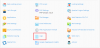
To this end, there are no problems. All entries are accounted for an up to date.
This time round, I decided to download my Log files, via FTP for inspection. Upon opening them, I noticed that the Log entries had stopped way back in February 2018. Of course, this is not something I want to happen.
Why has this happened?
I have had a browse around this Forum (and others), where I have come across a possible issue known as 'Log Rotation'.
Using Why does not log rotation work in Plesk? as a guide, I have headed over to 'Manage Log Files > Log Rotation' within the 'Logs' page, where I am met with the following screen:
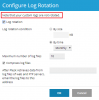 My first point of concern is the message 'Note that your custom logs are not rotated'. How can this be is the 'Log rotation' checkbox has been selected?
Secondly, is anyone able to highlight any issues with these settings? I would understand if the 'Log rotation' was set to 'By size'; as then it could be a case of increasing the file size?! The 'Log rotation' is not. Instead, it is set to 'By time'. As such, leading my assumption to be that Log Rotations occur at the end of each month.
Have I overlooked anything here or many my interpretation of how a 'Log Rotation' works is wrong?
Any guidance on this, would be much appreciated.
To this end, there are no problems. All entries are accounted for an up to date.
This time round, I decided to download my Log files, via FTP for inspection. Upon opening them, I noticed that the Log entries had stopped way back in February 2018. Of course, this is not something I want to happen.
Why has this happened?
I have had a browse around this Forum (and others), where I have come across a possible issue known as 'Log Rotation'.
Using Why does not log rotation work in Plesk? as a guide, I have headed over to 'Manage Log Files > Log Rotation' within the 'Logs' page, where I am met with the following screen:
Secondly, is anyone able to highlight any issues with these settings? I would understand if the 'Log rotation' was set to 'By size'; as then it could be a case of increasing the file size?! The 'Log rotation' is not. Instead, it is set to 'By time'. As such, leading my assumption to be that Log Rotations occur at the end of each month.
Have I overlooked anything here or many my interpretation of how a 'Log Rotation' works is wrong?
Any guidance on this, would be much appreciated.


