• Debian 11 has reached its end-of-life (vendor EOL date - August 31, 2026). Plesk Obsidian 18.0.81 is the last release to support it.
    If you are running Plesk Obsidian on Debian 11, we recommend you upgrade those servers to Debian 12 using our dist-upgrade tool.
  • We plan to deprecate and remove the support for XML RPC protocol versions earlier than 1.6.9.1 in Plesk Obsidian 18.0.82. We strongly recommend that you update all existing integrations using earlier versions of the XML RPC protocol to comply with the version 1.6.9.1 specification.

Wordpress Installation "broken"

Thera

Regular Pleskian
Hi,
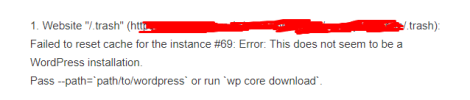
i got 2 Webseites who are broken, everday we get the message:
1647866034843.png
if i list the installations plesk ext wp-toolkit --list:

1647865999118.png
Wordpress Toolkit says that the installation is on "trash" but that's not true. I Copied the ID 70 to a new Wordpress Toolkit installation and now it Works. But the Message from the Old is nevertheless available
The Trash Folders are empty.
I Also tried to Install new with WP core Download.

thx for Help
 
Hello, Thera!
Do you want to get rid of repeating messages?
Can you just remove those broken installations, or do you have some reason to keep them?
 
And after you've removed it, it still in the output of the plesk ext wp-toolkit --list? And in the WPT's web UI too?
 
In the WPT Only the new site is visible, the old is not available

The screenshot from ssh is after moving the installation
 
Thanks for your answers! Let me clarify for myself.

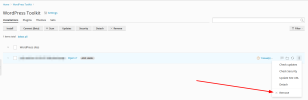
After you've removed (broken) WordPress installation using "Remove" option from the Web UI:
1647939957837.png

This installation is no longer visible in the Web UI, but still returned from the plesk ext wp-toolkit --list CLI command?

You can try to detach broken instance using CLI:
Code:
plesk ext wp-toolkit --detach -instance-id <your-instance-id>

This will remove record about this instance from the internal WPT database and prevent appearing it again after WPT's scan operation.
 
When you detach a WordPress website from the WordPress Toolkit, a file named .wp-toolkit-ignore is added in the root-folder of the WordPress website. That prevents it from adding it back to the WordPress Toolkit.

Just remove the file using the Filemanager (make sure you skip the Trash) and a new scan will attach the WordPress website to the WordPress Toolkit.
 
Back
Top