• The new Python extension is now available. It allows customers to deploy and manage WSGI-based Python applications on their websites directly from Plesk.
  • The Plesk Mobile apps for iOS and Android and the Plesk Mobile Center extension have been deprecated, and are no longer available for new installations. In Plesk Obsidian 18.0.84, the Plesk Mobile Center extension will be removed from servers during the upgrade, and the Plesk Mobile apps will lose their server management features.
  • The Social Login extension has been deprecated and will be removed in Plesk Obsidian 18.0.84. After that, it will no longer be possible to log in to Plesk with a Google, Facebook, GitHub account, or with a passkey. Plesk usernames and passwords, as well as logging in with a WebPros Account, are not affected.

wordpress multisite text editor broke

Antrax1

Basic Pleskian
RODUCT, VERSION, OPERATING SYSTEM, ARCHITECTURE:
  • Plesk Onyx v17.0.17 17
  • ‪Ubuntu 16.04.2 LTS‬
  • x64
  • php-fpm servered apache
PROBLEM DESCRIPTION:
text editor and media library work fine in principal blog but on other sites of the same network don´t work text editor and media library don´t show images

I TRY TO FIX WITH
check file permissions, activate error mode wordpress a make a new clean installation, change diferent option php to php-fpm servered apache from php-fpm servered ngnix and php-fastcgi servered apache, with same results. I use this .htaccess:

# BEGIN WordPress
<IfModule mod_rewrite.c>
RewriteEngine On
RewriteBase /wp/
RewriteRule ^index\.php$ - [L]

# add a trailing slash to /wp-admin
RewriteRule ^([_0-9a-zA-Z-]+/)?wp-admin$ $1wp-admin/ [R=301,L]

RewriteCond %{REQUEST_FILENAME} -f [OR]
RewriteCond %{REQUEST_FILENAME} -d
RewriteRule ^ - [L]
RewriteRule ^([_0-9a-zA-Z-]+/)?(wp-(content|admin|includes).*) $2 [L]
RewriteRule ^([_0-9a-zA-Z-]+/)?(.*\.php)$ $2 [L]
RewriteRule . index.php [L]
</IfModule>
# END WordPress

Also I see this post:
https://talk.plesk.com/threads/pppm-5855-cant-get-www-to-wordpress-domain.341787/

can be related? i use domain whitout www.
 
Last edited:
Hi Antrax1,

first of all, pls. be aware, that your issue is related to incorrect rewrite rules and it has nothing to do with Plesk or the Plesk Wordpress Toolkit.

Pls. note, that for example your code
RewriteBase /wp/
should be
Code:
RewriteBase /wp

If you experience further issues, experiment with the rewrites, as for example:
Code:
RewriteRule ^([_0-9a-zA-Z-]+/)?(wp-(content|admin|includes).*) wp/$2 [L]
RewriteRule ^([_0-9a-zA-Z-]+/)?(.*\.php)$ wp/$2 [L]
 
Hi UFHH01,

Sorry for the delay.

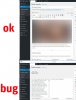
I see this problem occurs when I deselect the options: Websites and domains/Configuring Apache and nginx for domain xxx / Nginx configuration: Intelligent processing of static files and Serve static files directly using nginx

text editor_2.jpg
 
Hi Antrax1,

I see this problem occurs when I deselect the options: Websites and domains/Configuring Apache and nginx for domain xxx / Nginx configuration: Intelligent processing of static files and Serve static files directly using nginx
... which leads directly to => not being a bug, than a missing "Additional nginx directives" !!! :) ( Pls. consider again to read and follow my previous suggestion. ;) )
 
I try the next options:

A) Works with Select "Intelligent processing of static files and Serve static files directly using nginx" and this .htaccess
and don´t work deselect "Intelligent processing of static files and Serve static files directly using nginx"

Code:
<IfModule mod_rewrite.c>
RewriteEngine On
RewriteBase /wp
RewriteRule ^index\.php$ - [L]

# add a trailing slash to /wp-admin
RewriteRule ^([_0-9a-zA-Z-]+/)?wp-admin$ $1wp-admin/ [R=301,L]

RewriteCond %{REQUEST_FILENAME} -f [OR]
RewriteCond %{REQUEST_FILENAME} -d
RewriteRule ^ - [L]
RewriteRule ^([_0-9a-zA-Z-]+/)?(wp-(content|admin|includes).*) $2 [L]
RewriteRule ^([_0-9a-zA-Z-]+/)?(.*\.php)$ $2 [L]
RewriteRule . index.php [L]
</IfModule>

B) Don´t works secondary sites (error 500) with select/deselect "Intelligent processing of static files and Serve static files directly using nginx" and this .htaccess

Code:
RewriteRule ^([_0-9a-zA-Z-]+/)?(wp-(content|admin|includes).*) wp/$2 [L]
RewriteRule ^([_0-9a-zA-Z-]+/)?(.*\.php)$ wp/$2 [L]

C) Don´t works secondary sites (error 500) with select/deselect "Intelligent processing of static files and Serve static files directly using nginx" and this .htaccess

Code:
RewriteRule ^([_0-9a-zA-Z-]+/)?(wp-(content|admin|includes).*) var/www/vhosts/domain.com/httpdocs/wp/$2 [L]
RewriteRule ^([_0-9a-zA-Z-]+/)?(.*\.php)$ var/www/vhosts/domain.com/httpdocs/wp/$2 [L]
 
Last edited:
Back
Top