
 Facebook
 Twitter
goodomen
New Pleskian
- Server operating system version
- Ubuntu 20.04.5 LTS
- Plesk version and microupdate number
- Plesk Obsidian Version 18.0.46 Update #2
Hello, I am using Plesk Obsidian.
When I enable Caching (nginx) on the WordPress Toolkit the website is Server Error 403 Forbidden.
If i disble the Caching (nginx) the website is back online.
I think this started after a plesk to plesk server migration.
Although other websites are working with the Caching (nginx) enabled on this server.
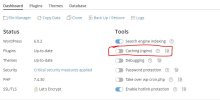
When I enable Caching (nginx) on the WordPress Toolkit the website is Server Error 403 Forbidden.
If i disble the Caching (nginx) the website is back online.
I think this started after a plesk to plesk server migration.
Although other websites are working with the Caching (nginx) enabled on this server.


