• The new Python extension is now available. It allows customers to deploy and manage WSGI-based Python applications on their websites directly from Plesk.
  • The Plesk Mobile apps for iOS and Android and the Plesk Mobile Center extension have been deprecated, and are no longer available for new installations. In Plesk Obsidian 18.0.84, the Plesk Mobile Center extension will be removed from servers during the upgrade, and the Plesk Mobile apps will lose their server management features.
  • The Social Login extension has been deprecated and will be removed in Plesk Obsidian 18.0.84. After that, it will no longer be possible to log in to Plesk with a Google, Facebook, GitHub account, or with a passkey. Plesk usernames and passwords, as well as logging in with a WebPros Account, are not affected.

Question WP Toolkit error

nj2la96

New Pleskian
Server operating system version
Ubuntu 24.04 LTS
Plesk version and microupdate number
18.0.62
I had migrated a Wordpress website from cPanel and somehow the content ended up in httpdocs/httpdocs, causing a nested httpdocs. I moved the content to httpdocs and deleted the nested httpdocs folder, but now my WP Toolkit is showing the error:

Scanning for WordPress websites was performed with errors:
  • Subscription "example.com": Failed to reset cache for the instance #9: filemng: Failed to change directory to /var/www/vhosts/example.com/httpdocs/httpdocs: No such file or directory System error 2: No such file or directory filemng: Failed to change directory to /var/www/vhosts/example.co /httpdocs/httpdocs: No such file or directory System error 2: No such file or directory
I also get a lot of "failed to reset cache" errors for that domain.

Any ideas?
 
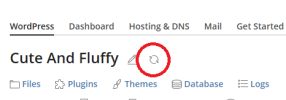
Try to reload the website into the WP toolkit with Refresh option (see image below).
Screenshot 2024-07-22 184303.png
 
Back
Top